Connection to Lecture 1:
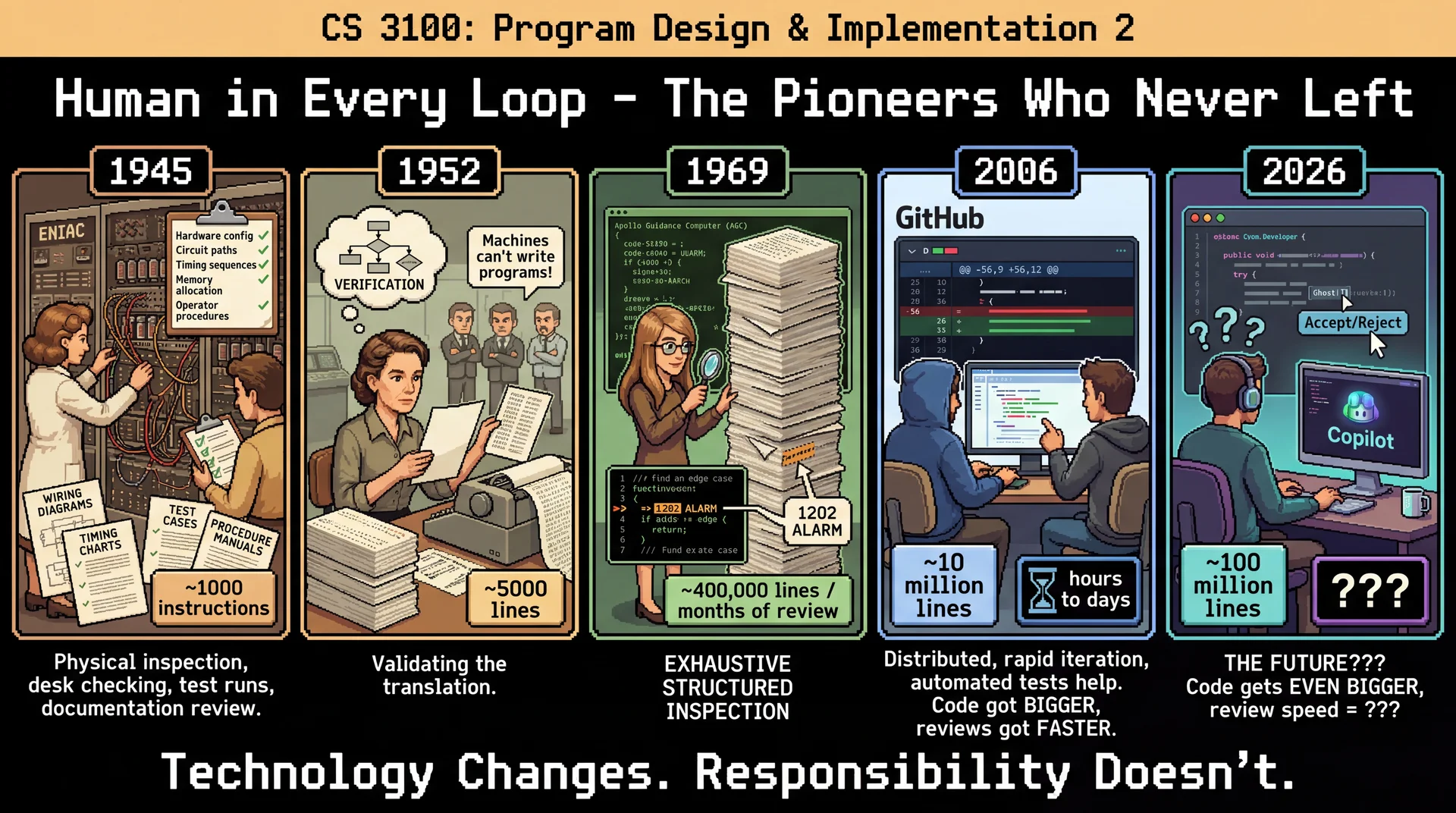
We started the semester with these same pioneers
Grace Hopper faced skeptics: "Machines can't write programs"
Margaret Hamilton's rigorous verification saved Apollo 11
The same pattern repeats with AI: tools generate, humans verify
The GitHub addition (2006):
Code review normalized having ANOTHER human check your work
Pull requests made review a first-class workflow
This trained an entire generation to expect review before merge
Now we apply those same skills to AI-generated code
The meta-point of this lecture:
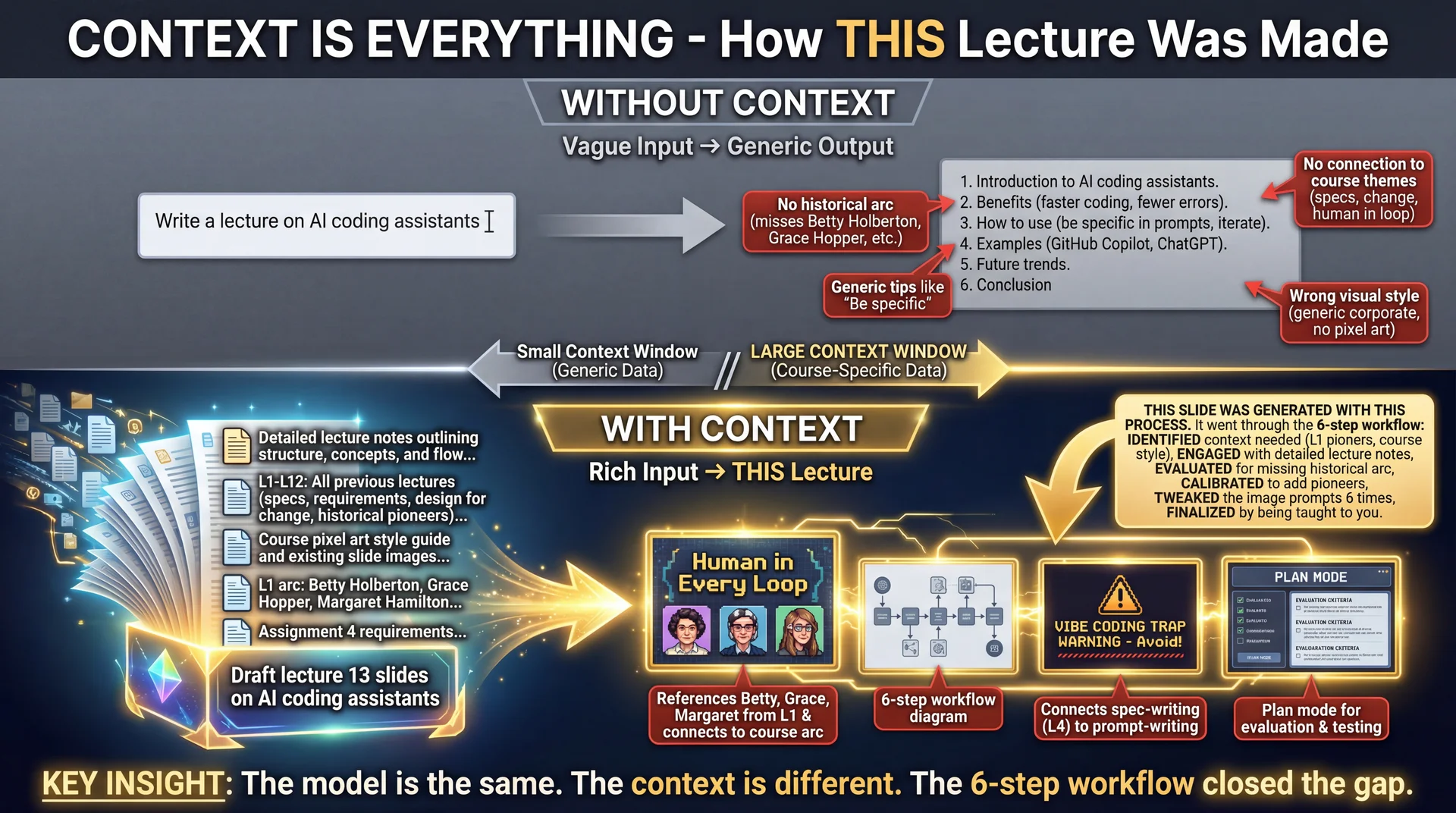
This lecture was generated with AI assistance
But I (the professor) did all 6 steps of the workflow
I identified what context to provide
I engaged with prompts
I evaluated every slide, every word
I calibrated when things went wrong
I tweaked the final output
I'm finalizing by teaching it to you
The irony is intentional:
An AI-generated lecture about not blindly trusting AI
Only works BECAUSE human judgment was applied
If I had "vibe-coded" this lecture, it would be terrible
The fact that it's (hopefully) good proves the workflow works
The message:
You stand in a line of pioneers
Each generation faced skepticism about "automatic programming"
Each generation kept human judgment in the loop
You continue that tradition
→ Transition: Let's get into the formal lecture...
CS 3100: Program Design and Implementation II Lecture 13: AI Coding Assistants
©2026 Jonathan Bell & Ellen Spertus, CC-BY-SA
Context from earlier lectures:
L4: Specifications—same principles apply to AI prompts
L7-L8: Design for change—AI helps explore design alternatives
L9: Requirements—stakeholder engagement parallels AI context management
Key theme: AI is a powerful tool, but like any tool, its effectiveness depends on how you use it. Today we'll learn the skills to use it well.
→ Transition: Here's what you'll be able to do after today...
This Is Just the Beginning of Our Conversation This topic is unlike anything we've covered so far :
The technology is evolving faster than any textbook can capture
There's genuine disagreement among experts about best practices
The hype is real—and so are the concerns
Your professors are learning alongside you, trying to model the best practices that we are teaching you
What comes next:
Lab 6 (Tuesday): Hands-on practice + surveys that will shape future lectures and workshopsRest of semester: AI will be woven throughout our remaining lectures and assignments—this conversation continues
This is an exciting moment to be learning together.
Why this framing matters:
Be honest with students: this is genuinely hard to teach
The field is moving so fast that last year's best practices may be outdated
There's real disagreement among practitioners and researchers
We're not pretending to have all the answers
What we DO have:
Foundational principles that transcend specific tools
A framework for thinking about human-AI collaboration
The 6-step workflow from research
Your own critical thinking skills
Lab 6 preview:
Required surveys on AI usage and concerns
Survey results will directly influence future content
Hands-on practice with AI coding assistants
This is formative—we're building this curriculum together
Tuesday fireside chat:
UG Advisory Committee organized this
Prof Bell and Associate Dean Christo Wilson
Broader conversation about AI in CS education
Encourage students to attend and bring questions
Rest of semester:
AI isn't a one-lecture topic—it's now part of the fabric of software engineering
Future lectures will reference back to these principles
Assignments will include AI-assisted components where appropriate
We'll revisit and refine based on what we learn together
The meta-point:
We're modeling the kind of thoughtful, iterative approach we're teaching
We don't have a perfect curriculum—we're building it with student input
This is what "learning together" actually looks like
→ Transition: Here's what you'll be able to do after today...
Learning Objectives
After this lecture, you will be able to:
Define AI programming agents and enumerate their capabilities and limitations Compare model provider tools (Copilot, Claude Code) with tool builder IDEs (Cursor, Windsurf) Apply a 6-step workflow for effective human-AI collaboration Determine when it is appropriate (and inappropriate) to use an AI programming agent Use AI coding assistants to accelerate domain modeling and design exploration Time allocation:
Foundations: What is an LLM + context windows (~5 min)
Objective 1: AI coding assistants + ecosystem (~12 min)
Objective 2: The 6-step workflow (~5 min)
Objective 3: When to use AI (~8 min)
Objective 4: Live demo with GitHub Copilot (~20 min)
Why this matters: AI coding assistants are transforming software development. Students who learn to use them effectively will be more productive—but only if they maintain the judgment and expertise that makes AI assistance valuable.
→ Transition: Let's start with what AI coding assistants actually are...
Poll: How would you supervise a SWE intern? Imagine you have graduated and have a full-time software engineering position
and are asked to supervise an intern on their first co-op. How would you guide
them and evaluate their work?
Text espertus to 22333 if the
https://pollev.com/espertus
What Is an LLM? Text Prediction at Scale
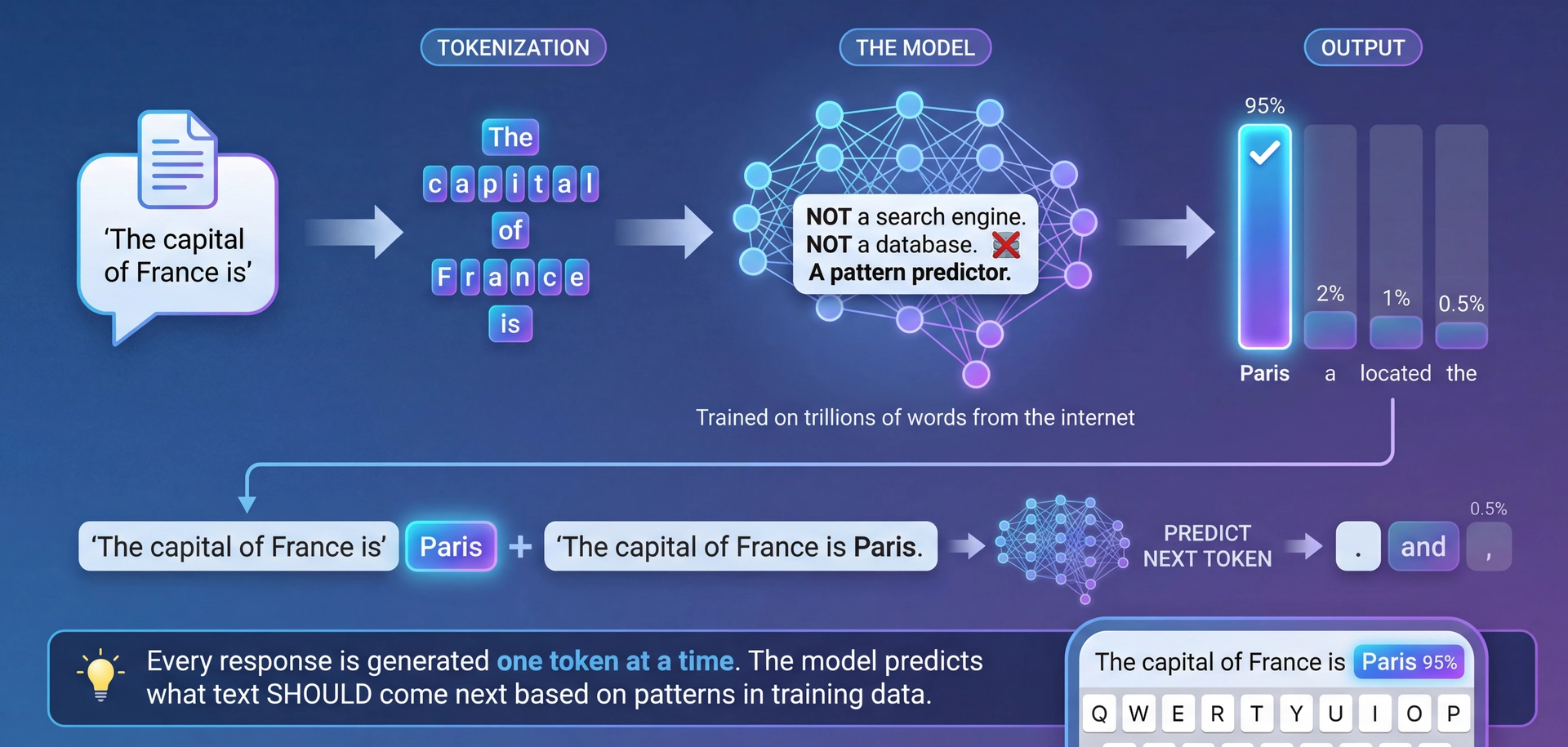
LLMs predict the next token based on patterns learned from training data. That's it.
The fundamental insight:
LLMs are NOT databases that store and retrieve facts
LLMs are NOT search engines that find information
LLMs are PATTERN PREDICTORS that generate plausible text
How it works:
Take input text, break into tokens (~words/subwords)
Model predicts probability of each possible next token
Sample from distribution (or take highest probability)
Repeat until done
Why this matters:
Explains hallucination: model predicts plausible-LOOKING text, not necessarily TRUE text
Explains why context matters: predictions depend on what came before
Explains strengths: patterns in code are highly predictable!
The autocomplete metaphor:
Phone keyboard suggestions, but trained on the internet
Really good at predicting what text SHOULD come next
Doesn't "know" anything—just predicts patterns
→ Transition: So if it's all about prediction, what determines the quality of predictions?
Model Tiers: Cost, Speed, and Capability Tier Examples Best For Tradeoff Fast/Cheap GPT-5-nano, Claude Haiku, Gemini Flash Simple completions, boilerplate, routine tasks Low cost, fast, but limited reasoning Balanced GPT-5-mini, Claude Sonnet Most coding tasks, explanations, refactoring Good balance of speed and capability Frontier Claude Opus, GPT-5.2, Gemini Pro Complex architecture, difficult bugs, novel problems Highest capability, but slower and expensive Tool-specific Cursor's composer-1, Copilot's internal models Optimized for that tool's workflow Tuned for speed in specific contexts
Most tools offer "Auto" mode — the tool picks the right model for each task. This is often the right default.
Pricing is usually per million tokens (input and output priced separately). Fast models: ~$0.10-0.50/M tokens. Frontier: ~$5-75/M tokens. Output tokens cost more than input.
Pricing basics:
Models charge per million tokens (roughly ~750K words per million tokens)
Input tokens (your prompt + context) and output tokens (model's response) priced separately
Output tokens typically cost 2-5x more than input tokens
Fast models: fractions of a cent per request
Frontier models: can be dollars per long conversation
This is why "auto" mode matters—no need to pay frontier prices for simple completions
Why this matters:
Different tasks need different models
Simple autocomplete? Fast model is fine
Architecture decision? You want frontier reasoning
"Auto" mode in modern tools:
Cursor, Copilot, Claude Code all have auto-selection
Tool decides: simple completion → fast model, complex reasoning → frontier
This optimizes cost/quality automatically
Let the tool handle this unless you have a reason to override
When to override auto:
Force frontier model for architecture decisions
Force fast model when you need quick iteration
Understanding tiers helps you make this call
The landscape changes fast:
Today's frontier is tomorrow's baseline
The tiers matter more than specific model names
Focus on understanding the tradeoffs
→ Transition: But the model is only half the equation—context determines output quality...
Context Is Everything The key insight of this entire lecture:
The MODEL is the same
The CONTEXT is different
The OUTPUT QUALITY is dramatically different
What is the context window?
Everything the model can "see" when generating
Early models: ~4,000 tokens (a few pages)
Modern models: 100,000-200,000 tokens (a novel)
Frontier: 1,000,000+ tokens (multiple books)
Why context matters for coding:
"Write a function to process orders" → generic
"Write a function to process orders [+ your Order class + your database schema + your error handling conventions]" → useful
This is why IDE integration matters:
Copilot sees your open files = more context
Claude Code can read your whole codebase = even more context
More relevant context = better predictions
The spec-writing connection (L4):
A vague spec yields unpredictable implementations
A vague prompt yields unpredictable outputs
Same principle, same solution: be specific about what matters
Teaser:
Are you curious now about the 6-step workflow?
That's one thing you'll learn today.
→ Transition: Now let's see how these tools integrate this into your workflow...
Poll: AI Coding Experience Have you used an AI coding assistant before? (GitHub Copilot, Cursor, ChatGPT for code, etc.)
A. Yes, regularly
B. Yes, occasionally
C. Tried it once or twice
D. Never
Text espertus to 22333 if the
https://pollev.com/espertus
Public Service Announcement
We can tell that some students are using AI-generated code without
documenting it . There's no penalty!
We are particularly disappointed that some students are using AI for
their reflections.
It's up to you whether to:
cheat
lie
waste time and money
show integrity
learn
You're not fooling us, but you may be fooling yourselves.
Remember Who You Are and What You Represent The Secret Sauce: Static Analysis Powers Context The through-line from "Context Is Everything":
We just said context determines output quality
But how do coding assistants GET the right context?
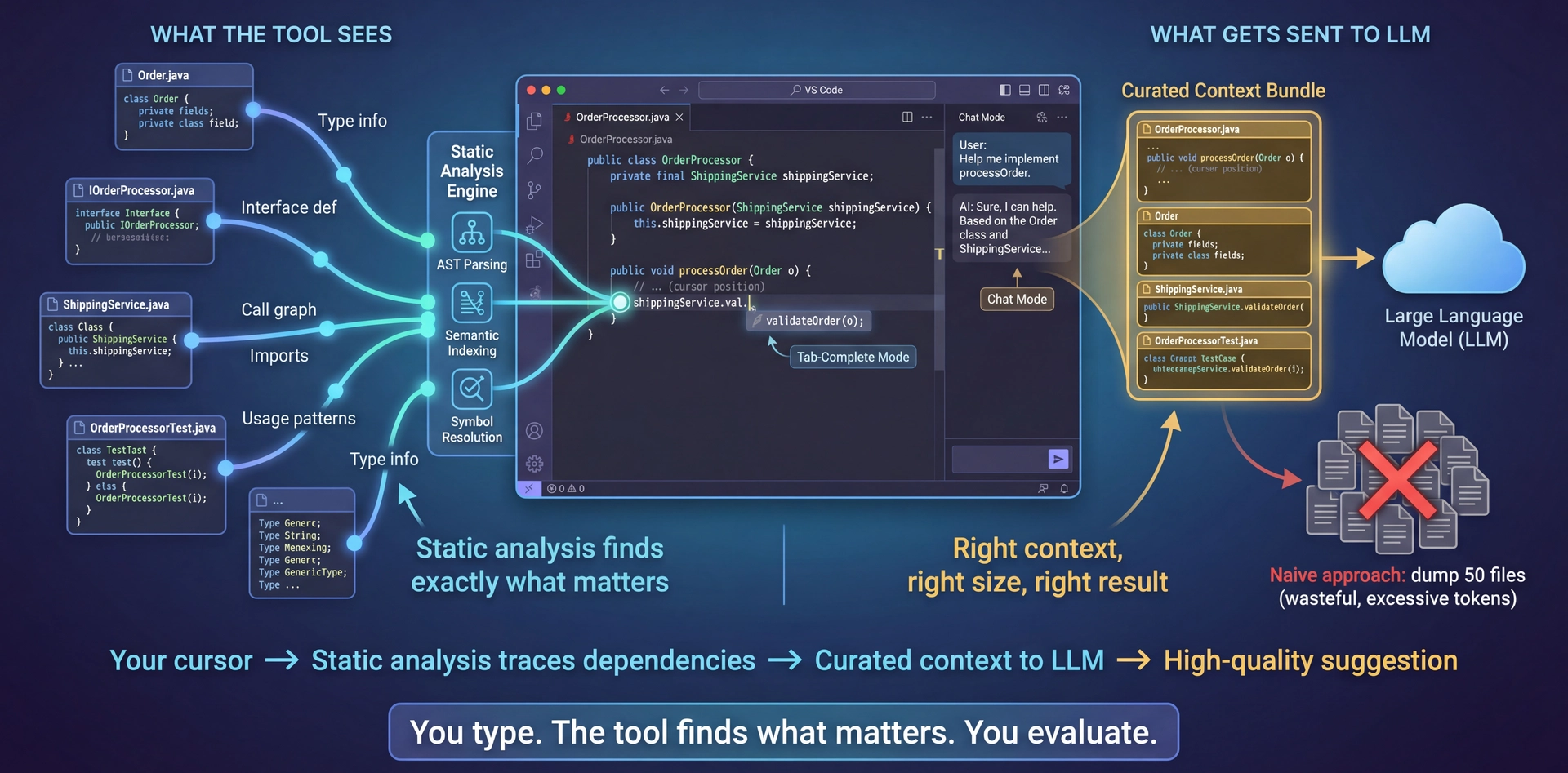
Answer: Static analysis—the same technology that powers your IDE's autocomplete, go-to-definition, and refactoring tools
What static analysis provides:
AST parsing: Understands code structure, not just textSemantic indexing: Knows what symbols mean, where they're definedCall graphs: Traces which functions call whichType information: Knows the types flowing through your code Why this matters:
When your cursor is in a method, the tool KNOWS:
What class you're in
What interfaces it implements
What types the parameters are
What methods are available on those types
It sends EXACTLY this to the LLM—not your whole codebase
The key insight:
Better static analysis = better context curation = better suggestions
This is what separates good tools from great ones
You don't need to learn "prompt engineering"—the tool does it for you
→ Transition: Let's see how this changes your interaction model...
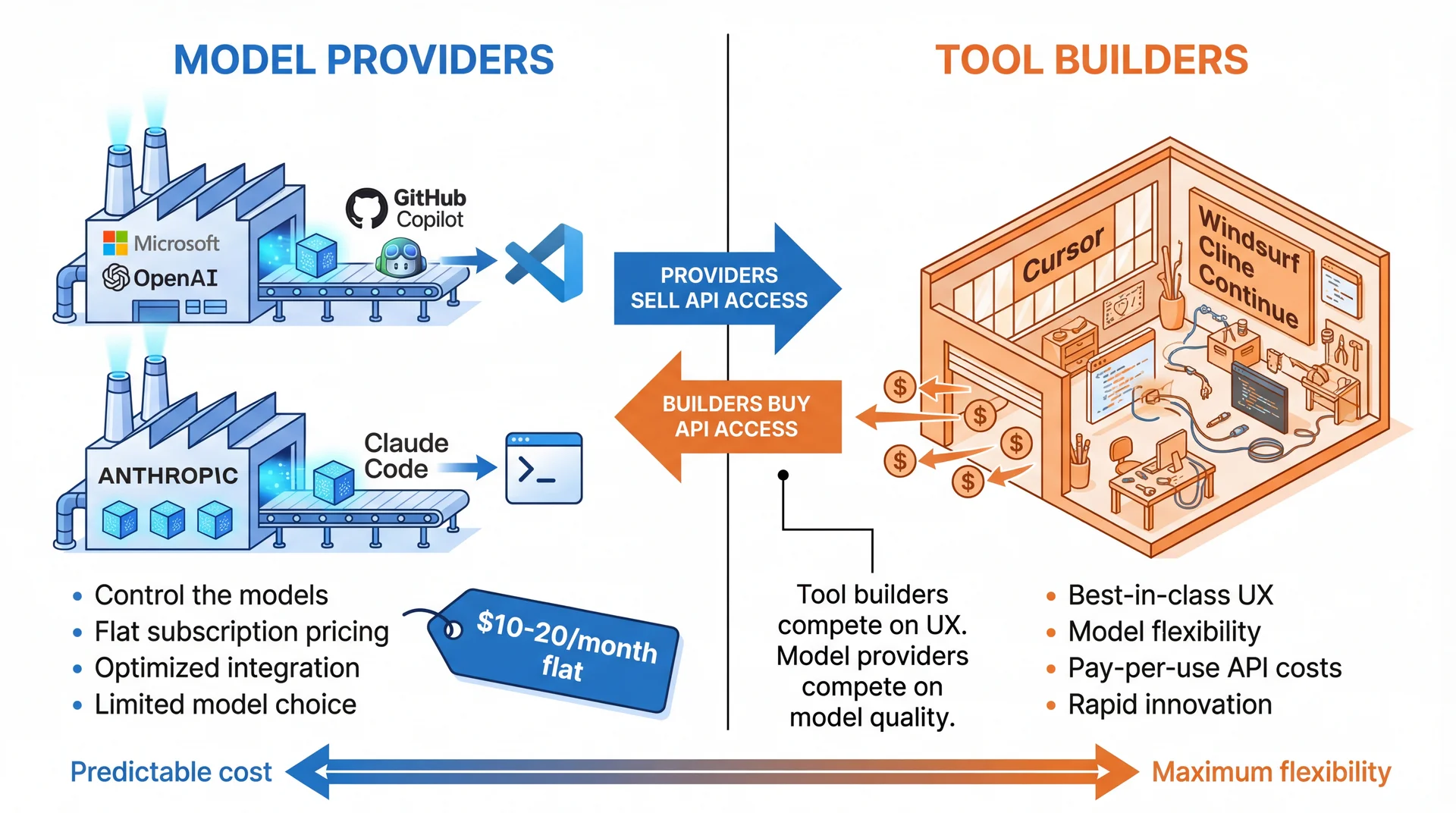
Two fundamentally different business models:
Model Providers (Copilot, Claude Code):
Microsoft/OpenAI → GitHub Copilot
Anthropic → Claude Code
They MAKE the models AND build tools
Subscription pricing ($10-20/month)
You're locked to their models
Tool Builders (Cursor, Windsurf, Cline, etc.):
They DON'T make models—they buy API (programmatic) access
Compete on UX, features, workflows
Can offer multiple models (GPT-4, Claude, Gemini, local)
Pricing often includes API pass-through costs
Why this matters:
Different cost structures
Different feature priorities
Different levels of model lock-in
→ Transition: Let's compare these in detail...
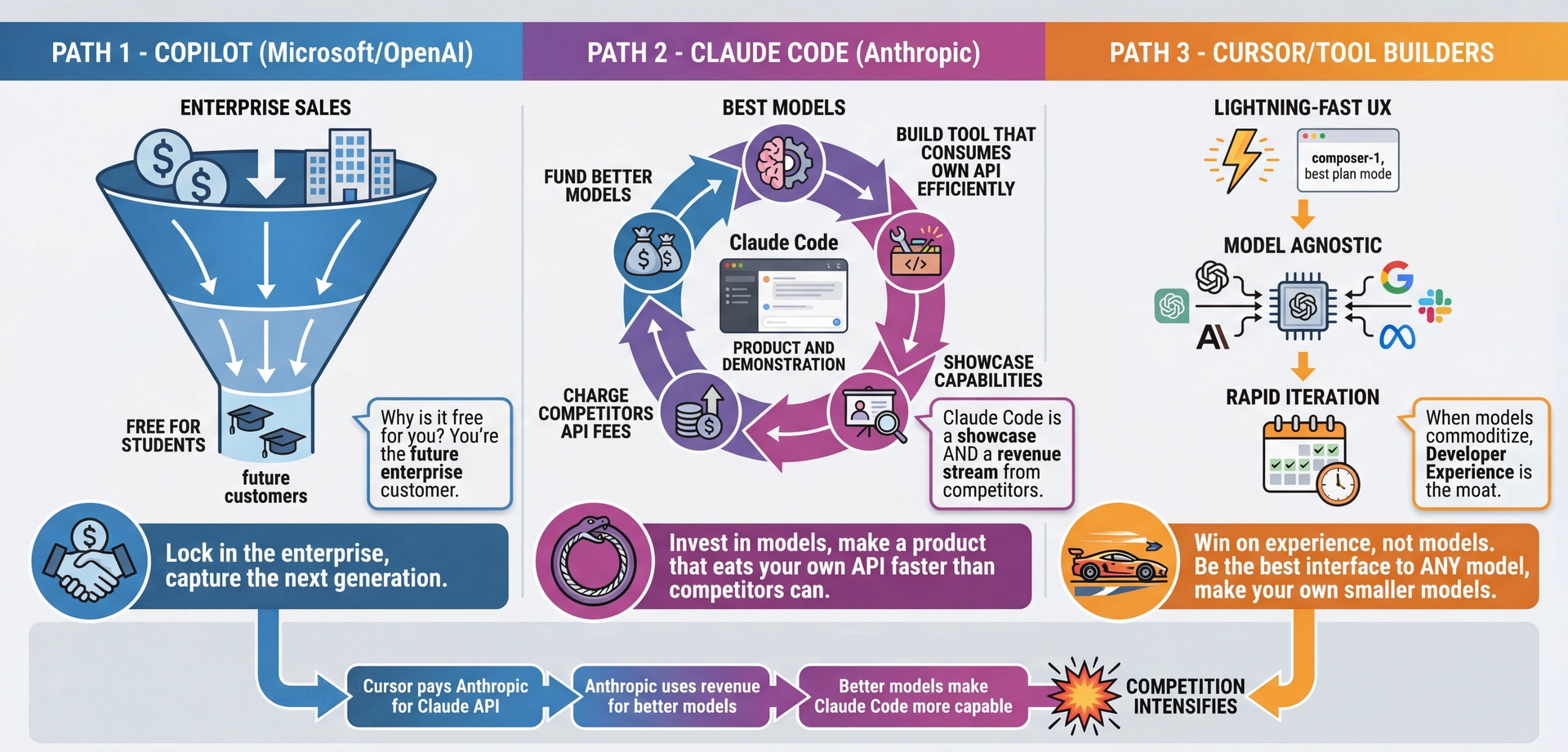
What Are They Optimizing For? Understanding the strategic game:
Copilot (Microsoft/OpenAI):
Sell to enterprise at premium prices
Give away to students (you!) for free
Why? You're the future enterprise customer
Classic "capture the next generation" strategy
Also: deep GitHub integration creates lock-in
Claude Code (Anthropic):
Pour resources into model quality
Build a tool that consumes their own API very efficiently
Two wins: showcase capabilities AND charge competitors
When Cursor uses Claude API, Anthropic gets paid
It's a flywheel: revenue funds better models
Cursor and Tool Builders:
Can't compete on models—so compete on UX
"Composer" is FAST—like, shockingly fast
Model-agnostic means they can switch to whoever's best
Betting that models commoditize, UX becomes the moat
Why this matters to you:
Helps you predict where tools are heading
Understand why features get prioritized
The "free" tier always has a strategy behind it
→ Transition: Let's look at a comparison table...
Strengths: Pattern Recognition and Cross-Domain Transfer Pattern recognition: Recognizes and reproduces common coding patternsSyntax knowledge: Extensive knowledge of language syntax, libraries, frameworksCross-domain transfer: Can apply patterns from one language/domain to anotherNatural language understanding: Translates business context into requirements into codeRapid prototyping: Generates boilerplate, tests, and common implementations quickly
Think of it as a very well-read junior developer who has seen millions of codebases.
What AI excels at:
It has seen MILLIONS of code examples during training
Recognizes patterns you might not know exist
Can translate between languages, frameworks, paradigms
The junior developer metaphor:
Knows a lot of syntax and patterns
Can work quickly on well-defined tasks
But needs guidance on architecture and design decisions
Doesn't understand YOUR specific project context
Connection to L4:
This is like having someone who knows every API signature
But doesn't know which API is right for YOUR requirements
→ Transition: But there are important limitations...
Limitations: Entirely Non-Deterministic, Limited Context Window Context window constraints: Can only see ~100K tokens at once—may miss parts of large codebasesNo runtime verification: Generates code based on patterns, not execution resultsTraining data cutoff: May not know recent libraries, API changes, or language featuresHallucination risk: May generate plausible-looking code that doesn't actually workCritical limitations to understand:
Context window:
Even 100K tokens isn't your whole codebase
AI might not see the module that matters
No execution:
The AI has NEVER RUN code
It predicts what code LOOKS like based on training data
Doesn't verify that code actually works
Hallucination:
AI might invent API methods that don't exist
Looks correct, compiles sometimes, but fails at runtime
This is why YOU must review ALL generated code
Connection to L4:
Remember: specs exist because we can't hold entire systems in our heads
AI has the same problem—it can't hold your whole system either
→ Transition: So where does AI fit in our systematic design process?
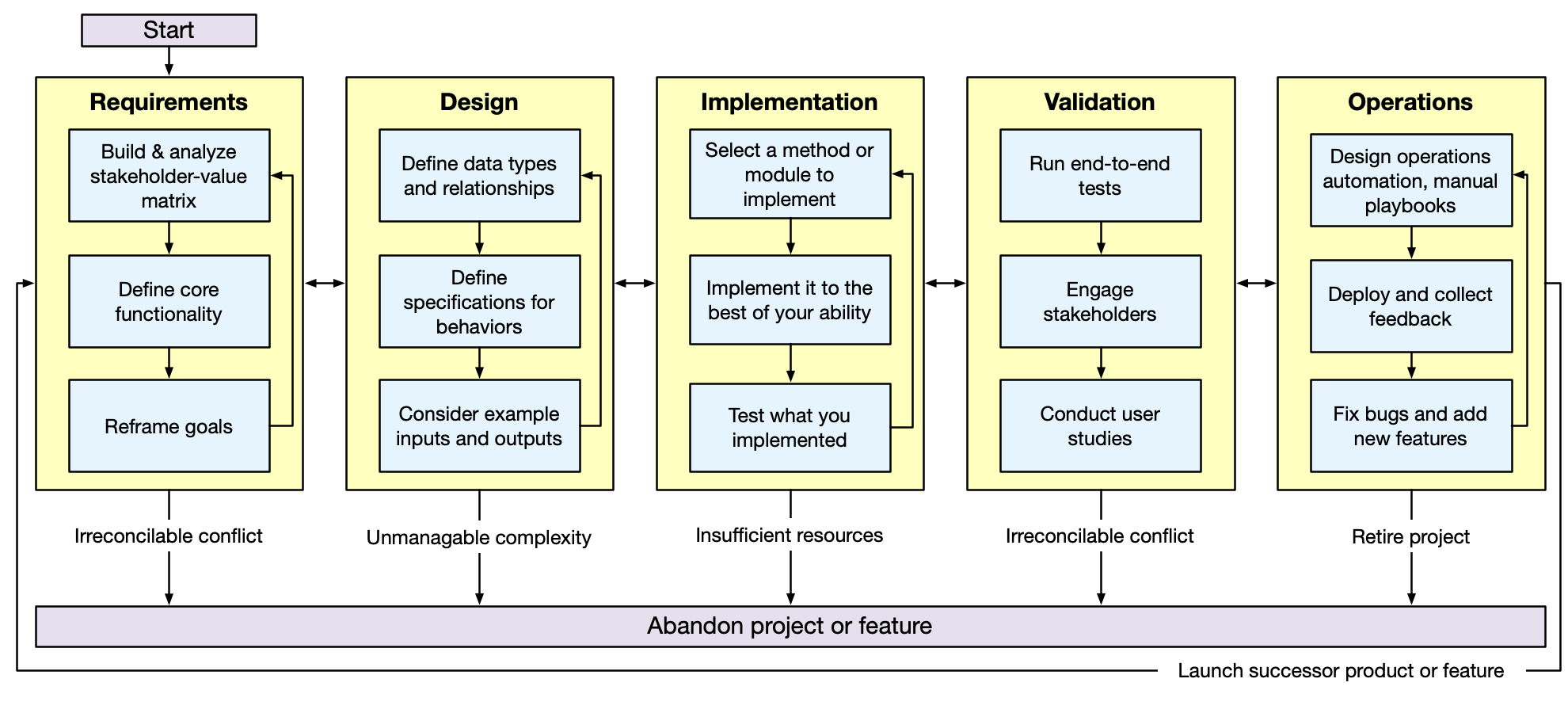
AI Assists Throughout the Software Development Lifecycle
AI can assist at every phase—but human judgment drives every decision.
AI isn't just for coding:
Requirements: Generate user stories, identify stakeholders
Design: Explore design alternatives, generate UML diagrams
Implementation: The obvious one—code generation
Validation: Generate test cases, identify edge cases
Operations: Deployment scripts, log analysis
The key insight:
AI doesn't REPLACE the process
It ACCELERATES parts of each phase
Human judgment is required at EVERY phase
Connection to L9:
Remember requirements analysis?
AI can help generate questions to ask stakeholders
But only YOU can engage with actual stakeholders
→ Transition: Now let's look at a systematic workflow for using AI effectively...
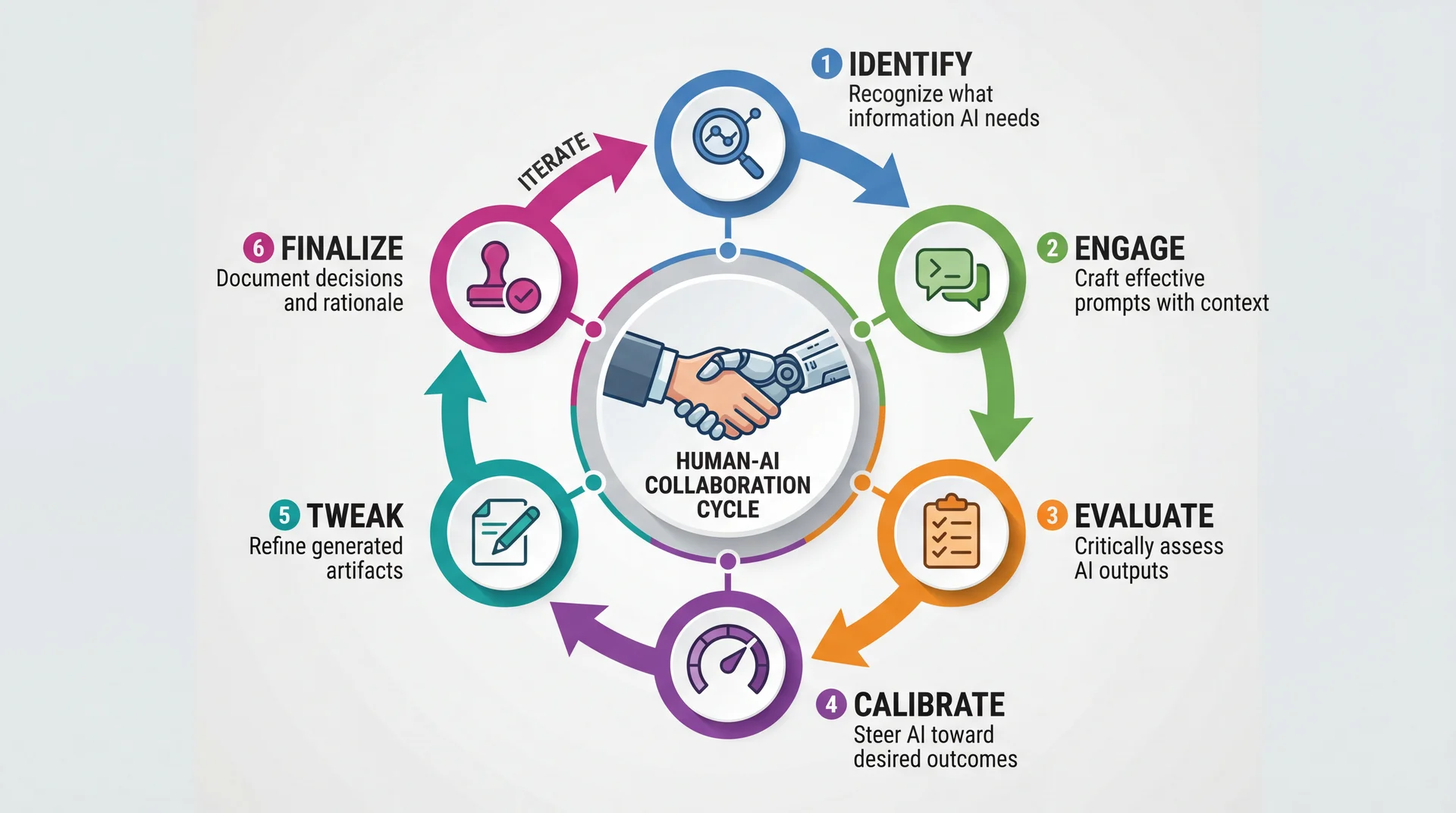
The 6-Step Human-AI Collaboration Workflow
Based on research on Developer-AI collaboration from Google
The workflow from Google research:
Studied 21 expert developers working with AI
Identified common patterns in effective AI use
This is NOT a rigid process—steps may overlap or repeat
Quick overview:
Identify: What does AI need to help you?Engage: Craft the prompt with appropriate contextEvaluate: Is the output what you expected?Calibrate: Guide AI toward better resultsTweak: Manually refine what AI generatedFinalize: Document what you decided and why The cycle:
This isn't linear—you'll loop back frequently
Evaluation often leads back to Identify or Engage
→ Transition: Let's quickly walk through each step...
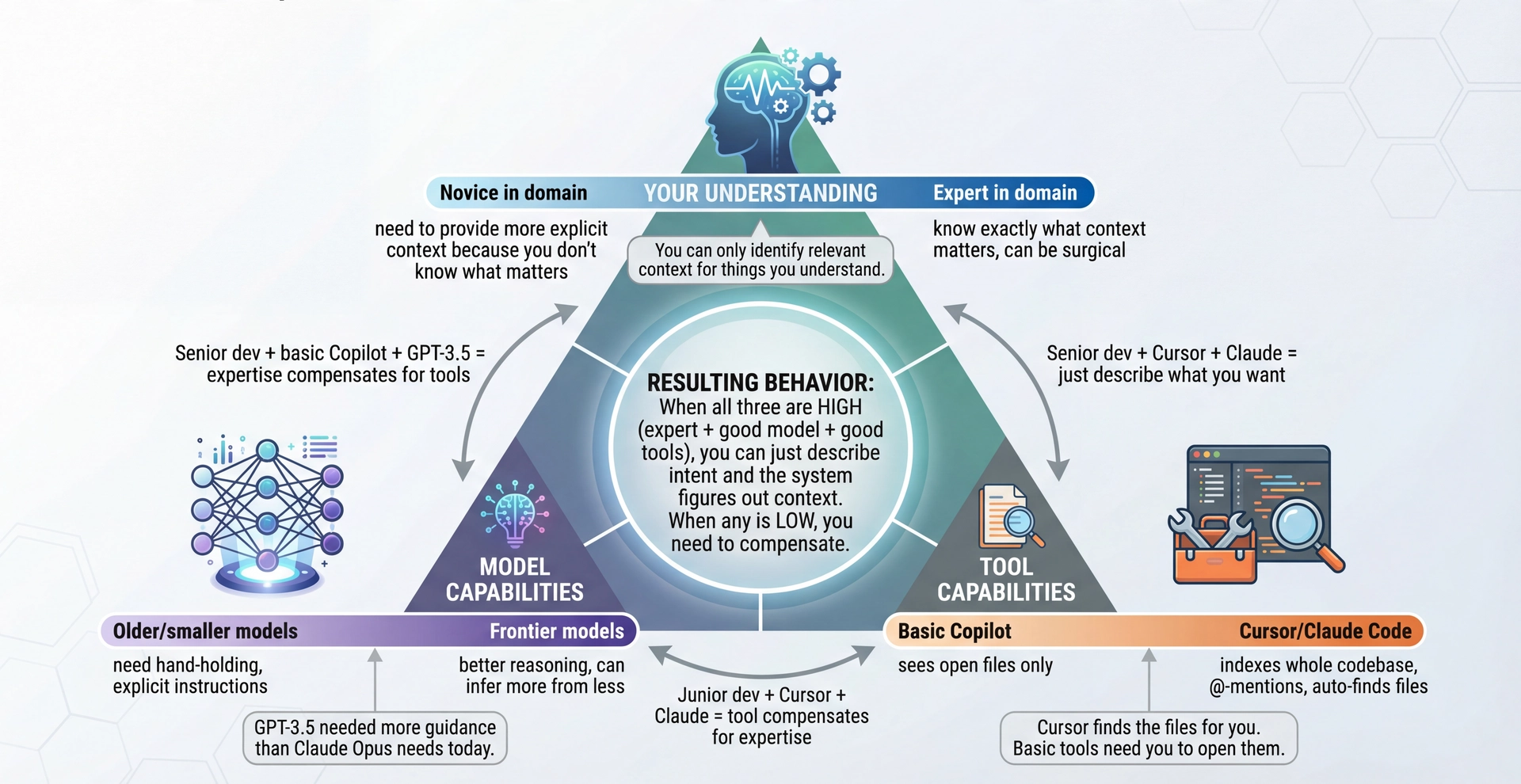
Identify & Engage: It Depends on Three Things The key insight: Identify/Engage isn't static—it depends on:
1. Your understanding of the problem:
If you're an expert, you know EXACTLY what context matters
If you're learning, you might not know what to include
You can only identify relevant context for things you understand!
2. Model capabilities (and they keep improving):
GPT-3.5 needed very explicit instructions
Claude Opus / GPT-4o can infer much more from less
Frontier models are increasingly good at asking clarifying questions
3. Tool capabilities (varies wildly!):
Basic Copilot: sees your open files, that's it
Cursor: indexes entire codebase, @-mentions, finds files automatically
Claude Code: searches codebase, reads files on demand
The tool determines how much YOU need to manually provide
The practical implication:
"Identify what context AI needs" is outdated for modern tools
Better framing: "Recognize when the tool WON'T find what it needs"
Modern tools often just... figure it out
→ Transition: So what does this mean practically?
Old Mental Model (2022-2023)
"I need to carefully identify and provide all relevant context"
Manually open all relevant files
Copy-paste code snippets into prompts
Describe file structure explicitly
Anticipate what AI needs to know
You do the work of context gathering
New Reality (2026+)
"I describe intent; the tool finds context"
Tools search your codebase automatically
You can reference specific files when needed
Tool indexes and retrieves relevant context
AI asks clarifying questions
Tool does context gathering; you validate
But: Tools can't find context that doesn't exist in code—requirements, design rationale, rejected alternatives. That's still YOUR job.
The shift in mental model:
Old way (still true for basic Copilot):
YOU identify what's relevant
YOU craft the perfect prompt
YOU provide all context upfront
Heavy burden on the human
New way (Cursor, Claude Code, advanced tools):
YOU describe what you want
TOOL searches and retrieves context
TOOL presents what it found
YOU validate and correct if needed
What tools CAN auto-find:
Related code files
Type definitions, interfaces
Similar patterns in codebase
Test files, usage examples
What tools CAN'T auto-find:
Why a design decision was made
Requirements that aren't in code
Conventions that aren't documented
Knowledge in your head
This is why DESIGN.md and documentation matter—it's context the tool CAN find!
→ Transition: But before we move on—let's clear up some prompting myths...
Prompting Myths That Don't Actually Help Myth Example Reality Persona prompts improve output "You are a brilliant 10x engineer who..." Models don't roleplay better code. Context and specificity matter, not flattery. Politeness affects performance "Please" and "Thank you" Doesn't affect the model—but polite, humble communication is a good habit for talking to humans! Threats or stakes help "I'll lose my job if you get this wrong" The model has no concept of your job. Just describe what you actually need. More instructions = better 500-word system prompts Often WORSE. Key details get lost. Be concise and specific. Magic phrases always work "Think step by step" everywhere Useful for reasoning, but tools have built this in better. See: Plan Mode.
What actually helps: Relevant context, specific requirements, concrete examples, clear success criteria.
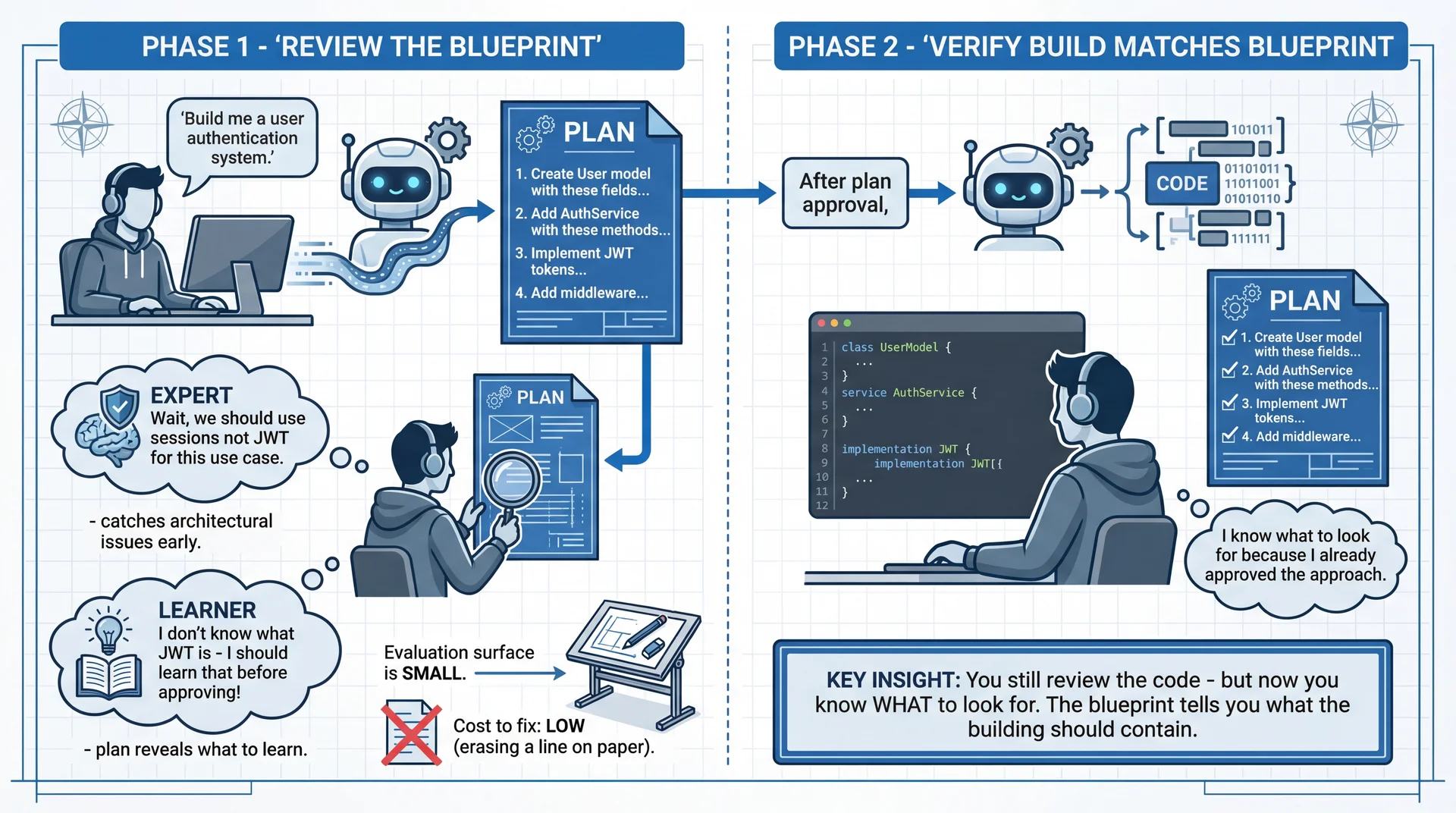
Plan Mode: Reducing Your Evaluation Surface The "think step by step" insight, productized:
Chain-of-thought prompting DOES help models reason better
But manually prompting it is clunky
Plan mode is the tool-level implementation of this insight
What Plan mode does:
AI generates a PLAN first (not code)
You review the plan (small evaluation surface!)
You refine the plan (cheap to change!)
THEN AI generates code based on approved plan
Why this matters:
Evaluating a 10-line plan is MUCH easier than evaluating 500 lines of code
Catching "wrong approach" at plan stage = minutes to fix
Catching "wrong approach" in code = hours to fix
Catching "wrong approach" in production = days/weeks to fix
Connection to L4 (specs):
This is EXACTLY what specs are for!
Get agreement on WHAT before implementing HOW
The plan IS a lightweight spec
Tools that support this:
Cursor: Plan mode in Composer
Claude Code: Thinks through approach before coding
Codex/ChatGPT: Can be prompted to plan first
When to use Plan mode:
Multi-file changes
Architectural decisions
Anything where "wrong direction" would be costly
NOT needed for: single-line fixes, simple refactors
→ Transition: But there's a deeper SE principle here...
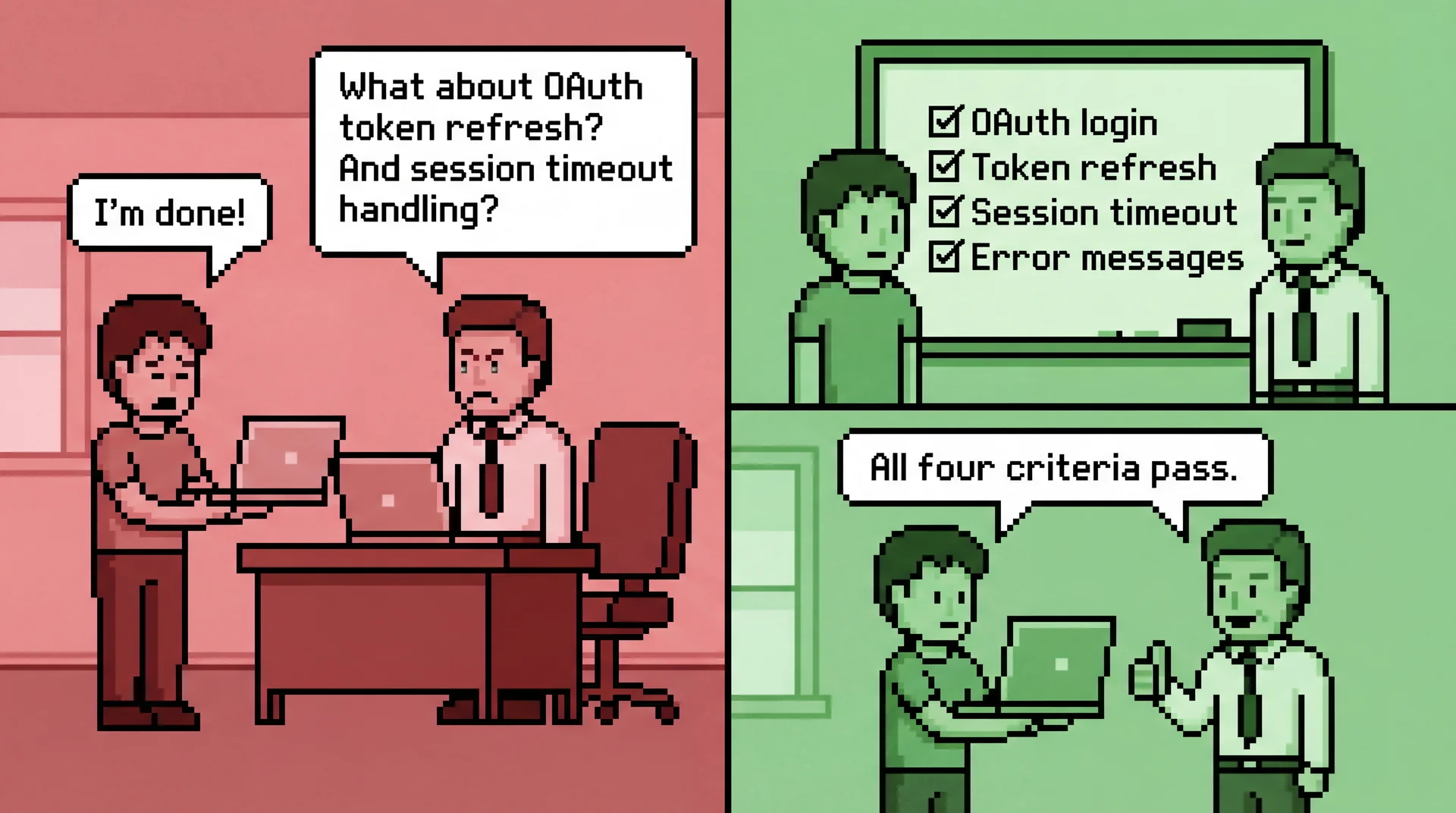
How Do You Know You're Done?
Whether waterfall or Agile, SE techniques share one thing: agree on what "done" means before you start each piece of work.
The intern/supervisor scenario:
You're an intern, you finish a task, you bring it to your supervisor
"I'm done!" → Supervisor looks, frowns: "No... where's the error handling?"
You didn't know that was required. Now you have to redo the work.
This happens ALL THE TIME in professional settings
The fix: agree on what "done" means BEFORE you start
The SE principle:
If you start making changes without knowing where you're going, how do you know when you arrive?
This is why we write specs (L4), define requirements (L9), create acceptance criteria
The same principle applies to AI-assisted work AND to working with humans
Without a definition of done:
"Make it better" → but better how? Better for whom?
Endless tweaking with no exit condition
"I'll know it when I see it" rarely works in practice
You waste time and never feel confident in the result
With a definition of done:
Clear success criteria BEFORE you start prompting (or coding)
Each output can be checked against the criteria
You know exactly when to stop
The plan you approved in Plan Mode IS your definition of done
Connection to CS4530:
This is an essential skill you'll practice more deeply in CS4530
Agile "Definition of Done", acceptance criteria, user stories
Start building this habit now—with AI, with supervisors, with yourself
Practical application:
Before starting ANY work, write down: "I'll know this is done when..."
Use that as your evaluation checklist
Plan Mode makes this explicit for AI work
Asking your supervisor "what does done look like?" makes it explicit for human work
→ Transition: Now let's talk about evaluation itself...
Evaluate: The Step That Never Changes What Changed What Stayed the Same Tools auto-find context You must evaluate if output is correctModels infer more from less You must spot hallucinations and errorsLess manual prompt crafting You must know if it fits your requirementsAI asks clarifying questions You must have domain expertise to answer
No matter how good the tools get, evaluation requires YOUR expertise.
This is why the "task familiarity" principle still applies—if you can't evaluate, you can't use AI effectively.
The constant across all tool/model improvements:
EVALUATION requires human expertise
No tool can tell you if the code is RIGHT for your context
No model knows your actual requirements
What evaluation looks like:
Does this match what I actually need?
Are there edge cases being missed?
Does this fit our architecture?
Is this the right abstraction?
The trap with better tools:
Easy to accept output because it "looks right"
Tool found lots of context, must be correct!
But context-gathering ≠ correctness
Connection to L4:
Same as reviewing code against a spec
Spec-writing skills → evaluation skills
If you couldn't write the spec, you can't evaluate the output
→ Transition: Steps 4-6 remain largely the same...
Steps 4-6: Calibrate, Tweak, Finalize Step What You Do Example 4. Calibrate Steer AI toward desired outcomes through feedback "That's close, but use interfaces instead of abstract classes" 5. Tweak Manually refine AI-generated artifacts Fix edge cases, adjust naming, add error handling 6. Finalize Document decisions and rationale Add comments or notes explaining why you chose this approach
The goal: AI accelerates initial generation, but YOU make the final decisions.
Calibrate is like iterative spec refinement:
Initial prompt was too vague? Add constraints
Output went wrong direction? Redirect explicitly
This is a CONVERSATION, not a single query
Tweak is inevitable:
AI output is rarely perfect
Naming might not match your conventions
Edge cases may be missed
This is expected and normal
Finalize is critical and often skipped:
Document WHY you accepted the AI's suggestion
Future-you needs to understand the rationale
This prevents "I don't remember why we did this" moments
→ Transition: Now the key question—when should you use AI at all?
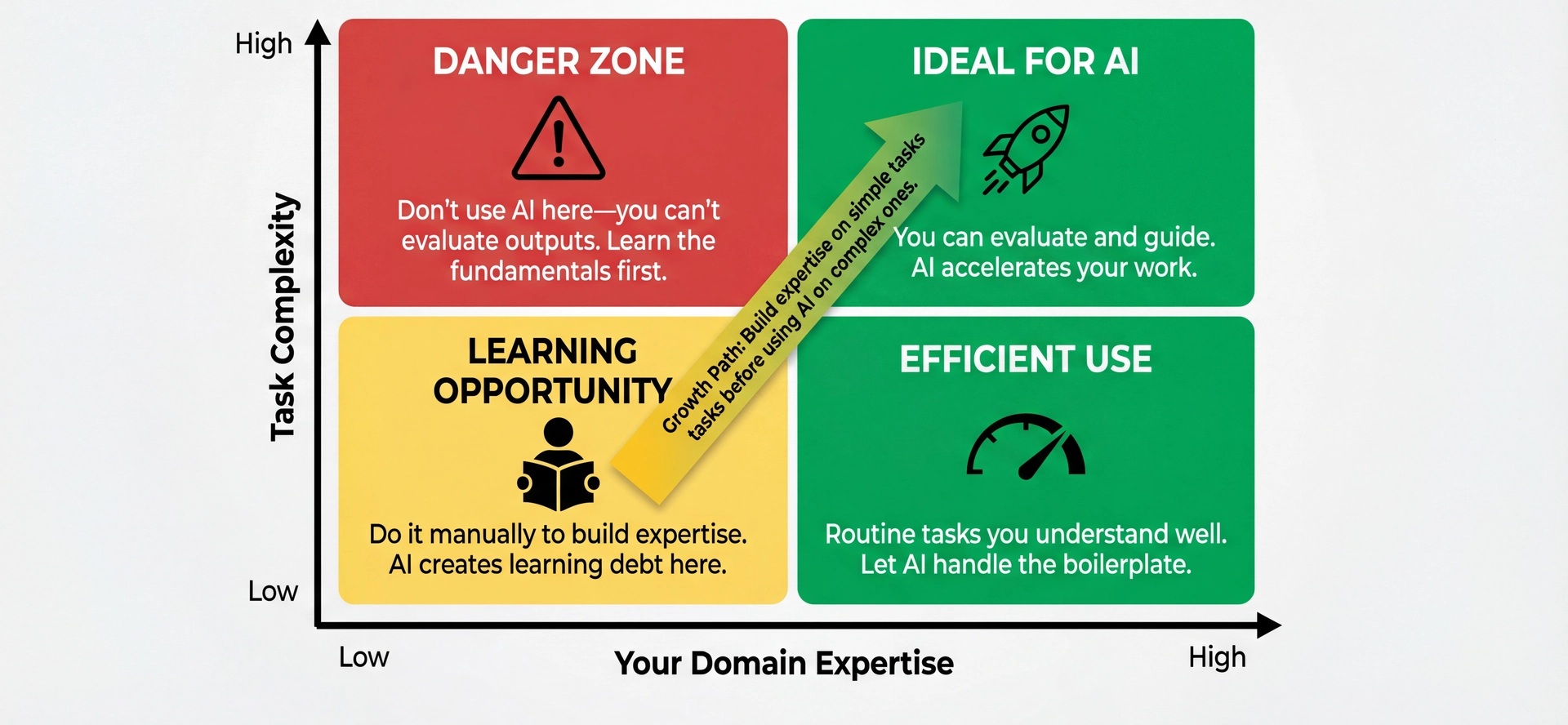
The Fundamental Principle: Task Familiarity The quadrant explained:
Bottom-left (Low expertise, Low complexity):
Simple tasks you don't know how to do
This is a LEARNING OPPORTUNITY
Do it manually! Build the knowledge base
Using AI here creates "learning debt"
Bottom-right (High expertise, Low complexity):
Routine tasks you understand well
Perfect for AI—let it handle boilerplate
You can instantly spot if something's wrong
Top-left (Low expertise, High complexity):
DANGER ZONE
Complex tasks you don't understand
You CAN'T evaluate AI's output
This is where "vibe coding" disasters happen
Top-right (High expertise, High complexity):
The sweet spot for AI assistance
Complex tasks where AI accelerates your work
You can evaluate, guide, and refine
Key insight: The ability to EVALUATE output determines appropriateness.
→ Transition: But there's another dimension to consider...
How Hard Is It to Evaluate?
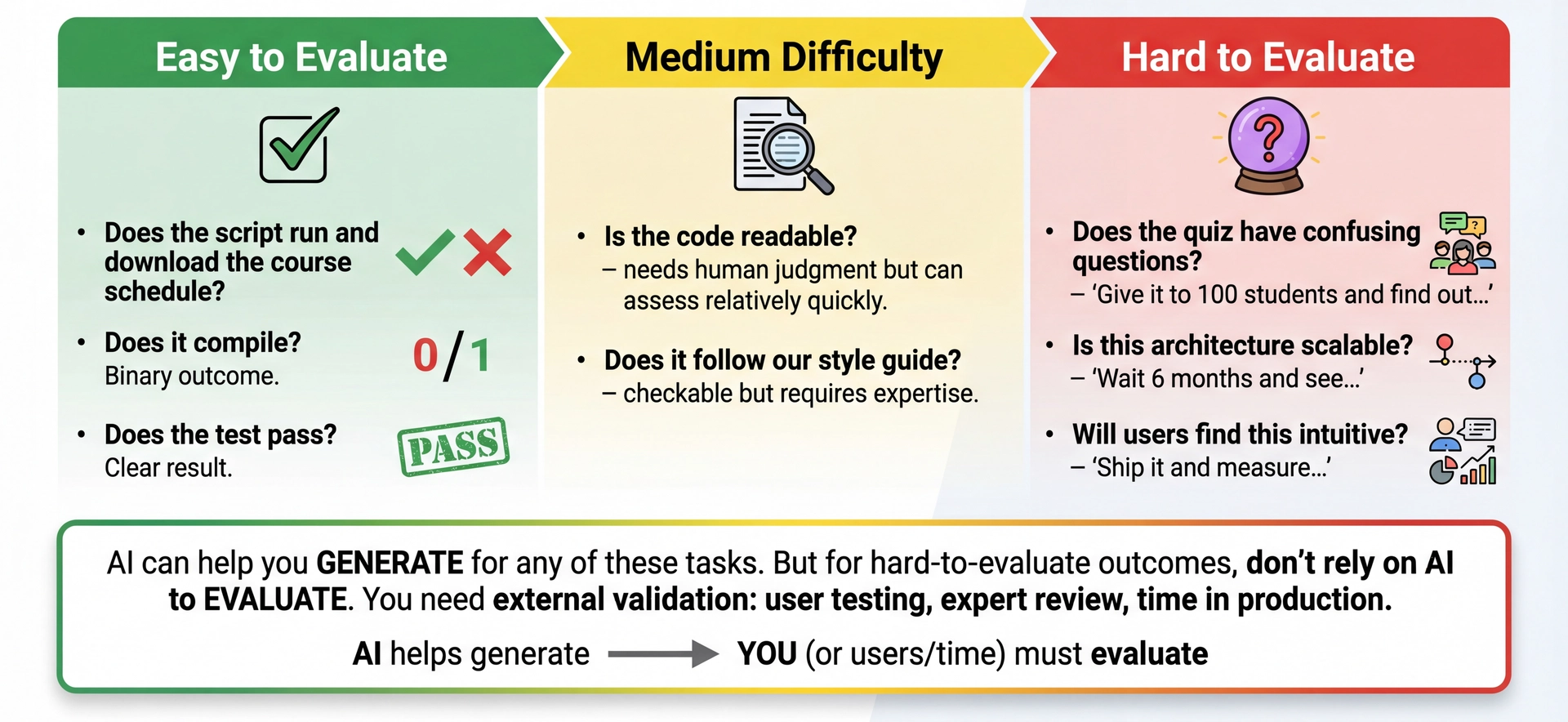
AI can help you generate for any task. But don't rely on AI to evaluate hard-to-evaluate outcomes.
The evaluation difficulty dimension:
Task familiarity tells you IF you can evaluate
Evaluation difficulty tells you HOW HARD it is to evaluate
Both matter for deciding how to use AI
Easy to evaluate (use AI freely):
Does the script run? (Yes/No)
Does it compile? (Yes/No)
Does the test pass? (Yes/No)
You can verify immediately
Hard to evaluate (use AI carefully):
Does the quiz have confusing questions? → Give it to 100 students
Is this architecture scalable? → Wait 6 months in production
Will users find this intuitive? → Ship and measure
The key nuance:
This DOESN'T mean "don't use AI" for hard-to-evaluate tasks
You CAN use AI to generate quiz drafts, explore architectures, prototype UIs
But don't trust AI's judgment on the OUTCOME
"This quiz looks clear to me" ≠ "Students won't find it confusing"
What to do for hard-to-evaluate tasks:
Use AI to generate options quickly
Get external validation: user testing, expert review, stakeholder feedback
Accept that some evaluations take time
→ Transition: Let's test your evaluation intuition...
Poll: Evaluating AI Output If AI generates a sorting algorithm and you don't know any sorting algorithms, how would you verify it's correct?
A. Run it on a bunch of test cases
B. Skim the code
C. I couldn't verify it properly
D. Trust it if it compiles
Text espertus to 22333 if the
https://pollev.com/espertus
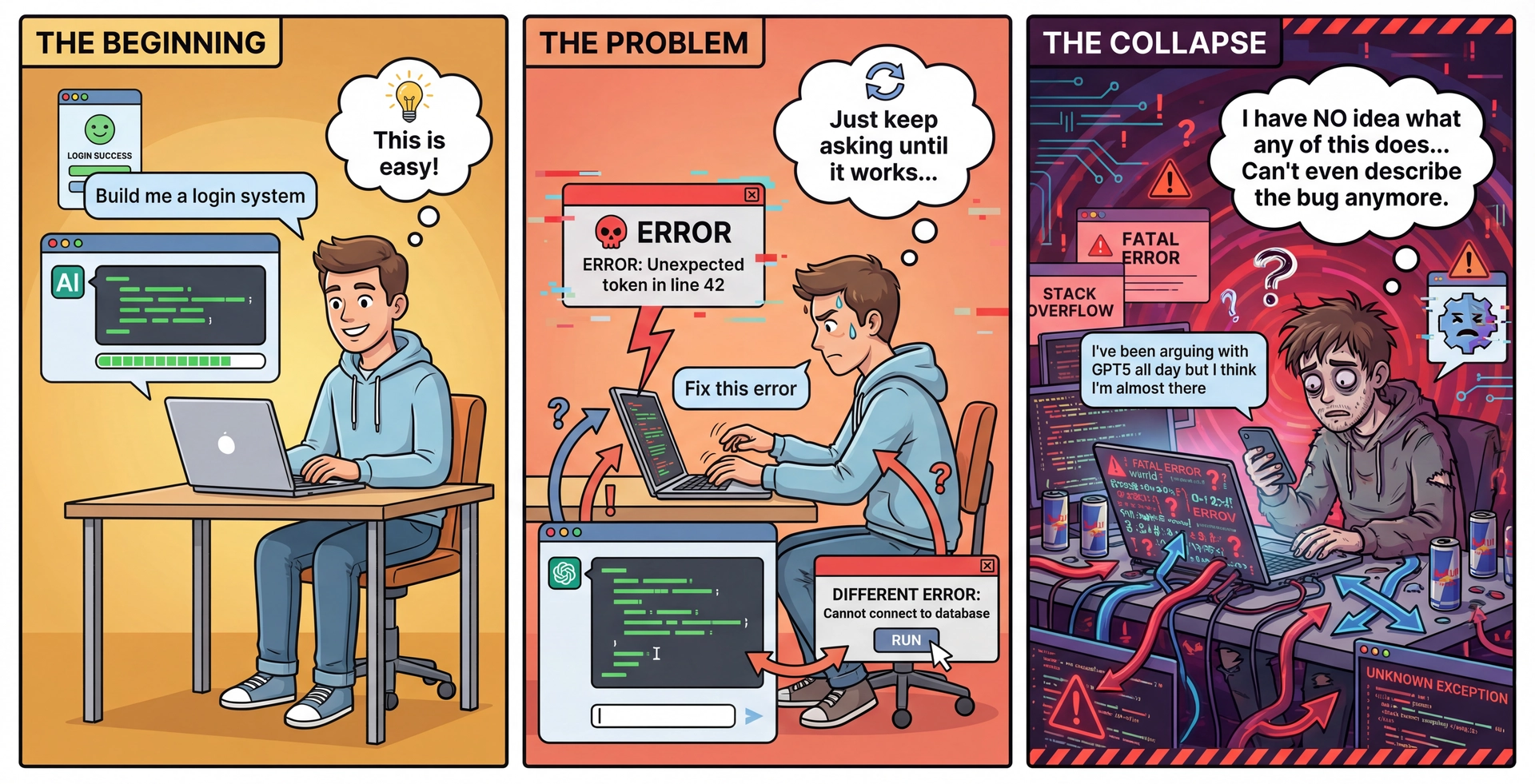
The "Vibe Coding" Trap What is "vibe coding"?
Only evaluating EXECUTION, not CODE
Ask AI to implement feature
Run app, see if it "works"
If error, describe error to AI, repeat
Never actually read or understand the code
Why it seems appealing:
You can get a "working" app without understanding anything
Feels fast at first
Why it leads to collapse:
No troubleshooting capability—you don't understand what the code does
Can't provide effective feedback—you can only describe symptoms
Brittle development—one change breaks everything
Dependency spiral—need AI for every tiny change
The key insight:
To effectively use AI, you must be able to EVALUATE the code itself
Not just "does it run"—does it do the RIGHT thing?
→ Transition: How do you know when to STOP using AI?
When to STOP Using AI and Change Your Approach Stop signals:
You can't evaluate the output — You're not sure if the code is correct or why it worksYou can't calibrate effectively — Repeated attempts don't move toward your goalYou're describing symptoms, not problems — "It's broken" instead of "The recursion doesn't terminate"You're repeating without progress — 3-4 variations of the same request aren't getting closer to what you need What to do instead:
Are there technical topics you should learn first? Do some manual implementation. Are there domain concepts you need to understand? Talk to stakeholders. Are the requirements unclear? Go back to requirements analysis (L9). Recognizing the stop signals:
Can't evaluate:
The code compiles but you're not sure if it's right
You'd have to run it to find out
This is the DANGER ZONE
Can't calibrate:
You've given feedback 3-4 times
AI keeps going in wrong directions
Problem: YOUR understanding might be incomplete
Describing symptoms:
"It crashes" vs "NullPointerException on line 42"
"It's slow" vs "The nested loops create O(n²) complexity"
If you can only describe symptoms, you can't guide AI
Repeating without progress:
You've tried 3-4 different phrasings of the same request
Each attempt isn't getting closer to what you need
This might mean: there's no right answer to give
Tools behave differently with false negatives vs false positives
Sometimes the task isn't well-suited for AI—reformulate your approach
Connection to L9:
Remember requirements elicitation?
Same skills apply—if you don't understand the domain, go learn it
→ Transition: There's also a learning consideration...
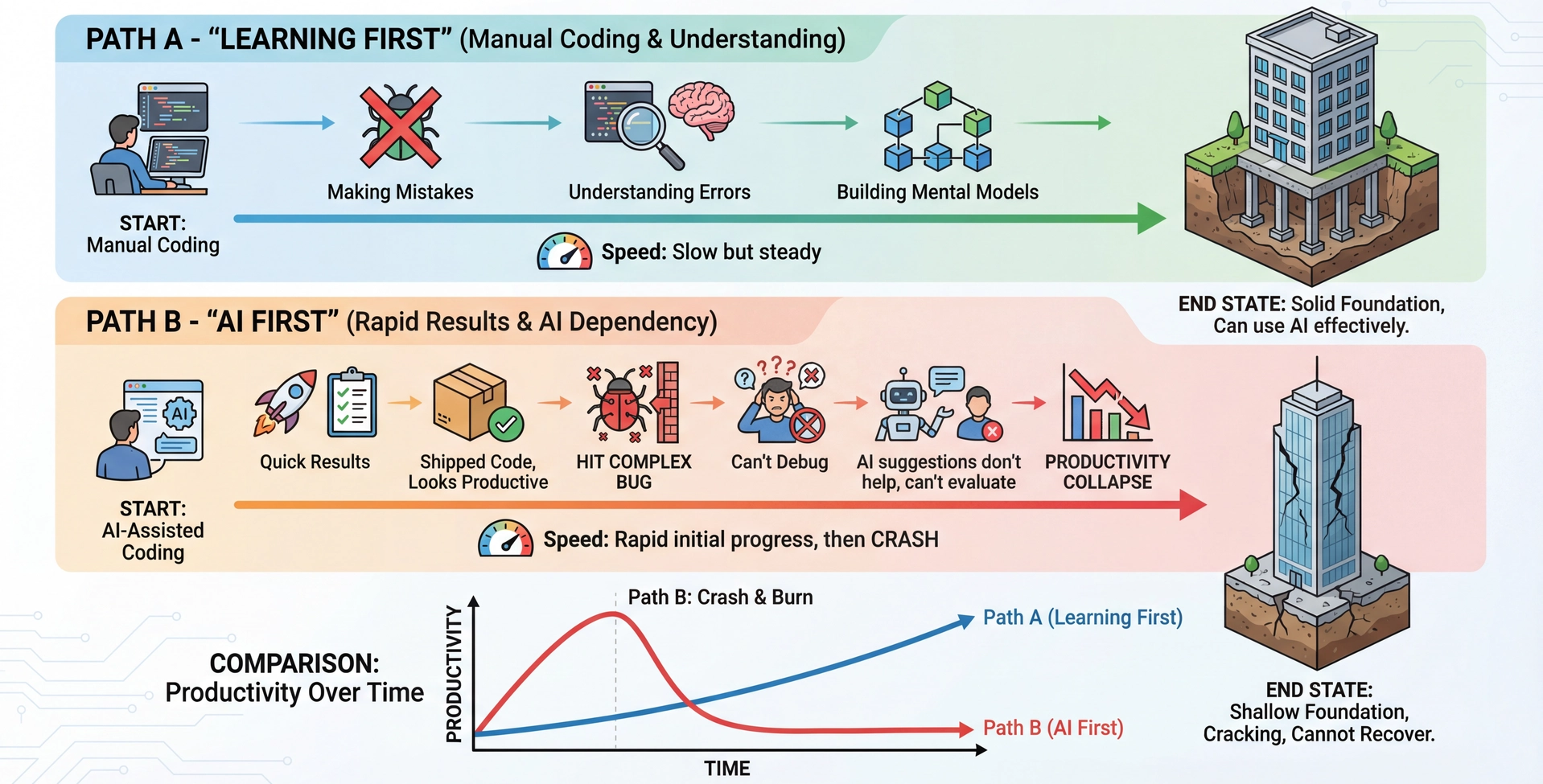
AI Creates "Learning Debt" When Used Too Early
The goal isn't to avoid AI — it's to use it in ways that support learning rather than replace it.
The car analogy:
When you get in a car, you should know you could crash
Does that mean you don't drive? No!
You learn to drive safely, understand the risks, and make informed choices
Same with AI: the goal isn't avoidance, it's informed, skillful use
The learning debt concept:
Like technical debt, but for YOUR knowledge
Functional code masks gaps in understanding
Works until you hit something that requires real expertise
There are ways to use AI that support learning vs. replace it:
SUPPORT: Use AI to explain concepts after you've tried manually
SUPPORT: Use AI to generate variations after you understand the pattern
REPLACE: Use AI to skip understanding entirely
REPLACE: Copy-paste without reading the code
Path A - Learning First:
Slower at first—manual work, mistakes, frustration
But you BUILD UNDERSTANDING
When you eventually use AI, you can evaluate and guide it
Path B - AI First:
Fast initial progress—ship features quickly
But you never learned WHY the code works
When complex bugs hit, you're stuck
You can't even describe the problem to AI effectively
The recommendation:
For this course: Do initial implementations MANUALLY
Then use AI for variations, extensions, boilerplate
Example: Implement JSON serialization for 2-3 classes by hand, then let AI do the rest
→ Transition: There are also long-term considerations beyond learning...
The Documentation Test Before committing AI-generated code, ask yourself:
Can I justify the design decisions in this code to a colleague? If I look at this in 6 months, will I know WHY I chose this approach? Am I prepared to take responsibility if this code is wrong? Would a new team member understand the design decisions?
If the answer to any of these is "no"—you're creating maintenance debt that future-you will pay.
The four questions, explained:
1. Can you explain it without AI?
If you need the AI to explain YOUR code, you don't understand it
Understanding is required for debugging, extending, and teaching others
Test: Rubber duck it. Can you explain each decision?
2. Will you know WHY in 6 months?
"It worked" is not a reason
"The AI suggested it" is not a reason
Document the actual design rationale
3. Did you document rejected alternatives?
AI often shows multiple approaches
Which did you reject and why?
This saves future-you from re-exploring dead ends
4. Would a new team member understand?
You won't be the only person reading this code
Internship/job: you'll onboard others to your code
They won't have your context (or your AI conversation)
The maintenance debt concept:
Every undocumented decision = interest on a loan
Future changes require re-learning the context
Compounds over time—small debts become big ones
→ Transition: Let's apply all of this in a live demo...
Demo: Domain Modeling with GitHub Copilot
Let's revisit SceneItAll from L2—an IoT/smarthome control platform:
Lights: Can be switched, dimmable, or RGBW tunableFans: On/off with speeds 1-4Shades: Open/closed by 1-100%Areas: Group devices by physical area, can be nestedScenes: Preset conditions for devices, with cascading AreaScenes
Goal: Use AI to explore domain model alternatives, following the 6-step workflow.
Demo setup:
We'll use GitHub Copilot Chat in VS Code
Walk through the 6-step workflow explicitly
Show both good and bad prompting techniques
What we'll demonstrate:
IDENTIFY: What context does AI need?
ENGAGE: Craft an effective initial prompt
EVALUATE: Critically assess the output
CALIBRATE: Guide toward our goals
TWEAK: Manually refine
FINALIZE: Document our decisions
Time allocation: ~25 minutes for demo + discussion
→ Transition: Let's start with Step 1: Identify...
Before prompting, ask yourself:
What domain concepts exist? (We have a basic list) What level of detail is needed? (Domain model, not implementation) What design constraints matter? (Design for change—L7) What artifacts would be useful? (Mermaid diagrams, comparison matrix)
Connection to L4: This is like writing a spec. What does the reader (AI) need to give you the right answer?
The Identify step:
DON'T just start typing a prompt
THINK about what AI needs to help you
For SceneItAll, we need to convey:
The domain concepts (lights, fans, shades, areas, scenes)
The relationships (areas nest, scenes contain device states)
The constraints (design for change, MVP focus)
The desired output (design alternatives, not just one)
Connection to L4:
Same questions as writing a method spec:
What does the reader need to understand?
What should NOT be over-specified?
→ Transition: Now let's craft the prompt...
Step 2: Engage with Context-Rich Prompt
This isn't a magic formula—it's showing what effective prompts have in common: context, constraints, and clear success criteria.
We are designing a new Java project called "SceneItAll". Our first step is
to enumerate some key requirements and explore domain model alternatives.

SceneItAll is an IoT/smarthome control app with the following domain concepts:
- Lights (can be switched, dimmable, or RGBW tunable)
- Fans (on/off and speeds 1-4)
- Shades (open/closed by 1-100%)
- Areas (group devices by physical area, can be nested)
- Scenes (define preset conditions for devices, with cascading AreaScenes)

Our domain model should emphasize "design for change" so that we can defer
decisions and get an MVP up soon for user feedback.

Generate a MODEL.md file with several design alternatives expressed as
mermaid class diagrams, including pros/cons for each.
This is NOT a magic prompt formula:
The specific format doesn't matter
What matters: context, constraints, clear success criteria
This example shows what success LOOKS LIKE, not a template to copy
Notice the structure:
Context: What project, what phase
Domain: Specific concepts with details
Constraints: "Design for change", "MVP soon"
Desired output: Specific artifact format
What makes this effective:
Tells AI WHAT we want, not HOW to do it (like a good spec!)
Provides enough domain context
States evaluation criteria (how will we judge the output?)
Requests specific, usable artifacts
What to expect:
AI will generate multiple alternatives
Each with pros/cons
We'll need to EVALUATE and CALIBRATE
→ Transition: Let's run this and see what we get... [LIVE DEMO]
Step 3: Evaluate Against Success Criteria
When evaluating AI output, ask:
Does it capture all the domain concepts we identified? Do the design alternatives actually differ in meaningful ways? Are the pros/cons accurate? (Use YOUR domain knowledge!) Does it support "design for change"? Is anything WRONG? (Hallucinated patterns, incorrect relationships)
This is where YOUR expertise matters. AI can generate; only YOU can evaluate.
Evaluation in practice:
Read through each alternative carefully
Check: Do these relationships make sense?
Check: Are the pros/cons reasonable?
Check: Did AI miss anything important?
Common issues to look for:
Missing domain concepts
Overcomplicated designs (AI sometimes over-engineers)
Patterns that look right but don't fit the domain
Pros that aren't really pros for YOUR context
Connection to L4 (specs):
We're evaluating if the output is CORRECT
Same mental process as code review
If output is good: Move to Calibrate/Tweak
If output is poor: Either Calibrate (redirect) or re-Identify (we missed something)
→ Transition: Let's calibrate toward our goals... [LIVE DEMO continues]
Step 4: Calibrate Toward Your Goals
Example calibration prompts:
"Alternative 2 is interesting, but I'm concerned about type safety. Can you show how a client would call methods on a generic Device without knowing its type?"
"The Scene design assumes devices are always online. What happens when a device is offline when a scene is activated?"
"I like the hybrid approach, but we should use interfaces instead of abstract classes for the plugin system—show me what that looks like."
Calibration is a conversation —guide AI toward better solutions.
Calibration techniques:
Point to specific concerns
Ask "what if" questions
Request modifications to promising approaches
This is iterative:
You might calibrate 3-4 times
Each round refines the output
This is NORMAL and EXPECTED
When calibration isn't working:
If 3-4 rounds don't improve things
You might need to go back to Identify
Maybe AI needs different context
Connection to L9 (requirements):
This is like stakeholder dialogue!
You're the "stakeholder" with domain knowledge
AI is the "developer" who needs guidance
→ Transition: Let's see calibration in action... [LIVE DEMO continues]
Steps 5-6: Tweak and Finalize Step 5: Tweak
Manual refinements after AI generation:
Naming: Match your conventions
Edge cases: Add handling AI missed
Comments: Explain WHY, not just WHAT
Style: Adjust to team standards
How do you know you're done?
It meets your plan/spec criteria
It passes your tests
You can explain every decision
Step 6: Finalize
Document for future reference:
Update DESIGN.md with chosen approach
Record rejected alternatives and WHY
Note any assumptions made
Commit with descriptive message
The goal isn't AI-generated code. It's code YOU understand and can maintain.
Tweak is always necessary:
AI output is rarely perfect
This is EXPECTED, not a failure
Your tweaks add the domain knowledge AI lacks
How do you know you're done tweaking?
Connect back to your definition of done (from Plan Mode)
Check against the success criteria in your original prompt
Apply the Documentation Test: can you justify it? will you understand in 6 months?
Tweaking ends when: it meets the spec, passes tests, and you can explain every decision
Finalize is often skipped but critical:
Document what you decided
Document WHY (not just what)
Future-you will thank present-you
Connection to L7 (design for change):
Good documentation enables change
If you don't know WHY something was chosen, you can't safely change it
The deliverable isn't AI output:
It's code YOU understand
Code YOU can maintain
Code YOU can explain to others
→ Transition: Let's complete the demo and see the final result... [LIVE DEMO concludes]
Demo Recap: What We Built
Using the 6-step workflow with GitHub Copilot, we:
Identified context needs: domain concepts, design constraints, desired outputsEngaged with a context-rich prompt specifying what, not howEvaluated multiple design alternatives using our domain knowledgeCalibrated toward our goals through iterative dialogueTweaked the output to match our conventions and add missing detailsFinalized by documenting our choice and rationale
AI accelerated exploration. Human judgment made the decisions.
Key Takeaways AI amplifies, doesn't replace: Quality of output depends on quality of YOUR inputUse the 6-step workflow: Identify → Engage → Evaluate → Calibrate → Tweak → FinalizeTask familiarity determines appropriateness: If you can't evaluate the output, don't use AI for that taskAvoid "vibe coding": You must evaluate CODE, not just executionDocument decisions: The FINALIZE step prevents "why did we do this?" moments
The spec-writing skills from L4 directly apply to writing effective prompts. Ambiguous prompts → unpredictable outputs.
The core message:
AI is a powerful tool
Like any tool, effectiveness depends on skill
Your expertise determines AI's usefulness
Connections to prior lectures:
L4 Specs: Same principles for prompts
L7-L8 Design: AI helps explore alternatives
L9 Requirements: Context management parallels stakeholder engagement
Looking ahead:
Assignment 4 will use AI assistance
Apply these principles deliberately
Document your process
→ Transition: Next steps...
Next Steps Set up GitHub Copilot if you haven't already (free with GitHub Education) Lab 6: AI Coding Agents, HW3: CYB with AI Recommended reading: