Cook Your Books: Project Overview
Throughout this semester, you will build CookYourBooks, a comprehensive desktop application for managing digital cookbooks and recipes. This real-world application addresses a common problem: how to efficiently digitize, organize, and use recipes from physical cookbooks and websites. The final product will feature OCR-powered recipe extraction from images, a rich domain model for representing complex recipe structures, intelligent scaling and unit conversion, and both command-line and graphical user interfaces. By the end of the course, you'll have created a fully-functional application that could genuinely be used by home cooks and professional chefs alike—something substantial enough for your portfolio that demonstrates your ability to design and implement complex software systems. For inspiration on what a real-world application might look like, refer to existing products EatYourBooks, ChefSteps' Recipe Interface, and CookShelf.
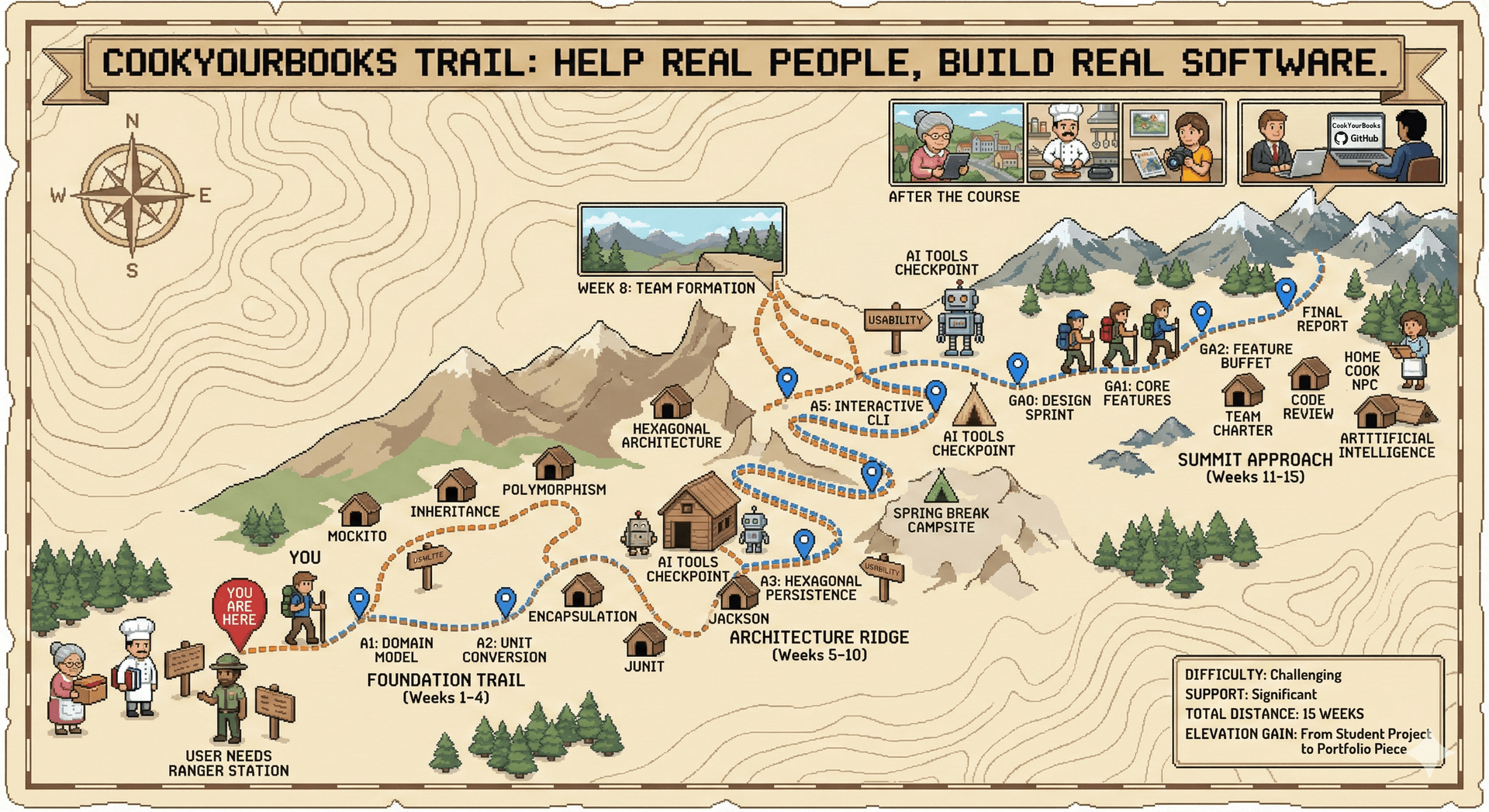
The project follows a carefully scaffolded approach where each weekly assignment builds upon the previous one, with our solution to each assignment provided as the foundation for the next. You'll begin in Module 1 (Design in the Small) by implementing the core domain model—learning to design rich object hierarchies for ingredients, quantities, and recipes while practicing fundamental OO principles like inheritance, polymorphism, and encapsulation. As you progress into Module 2 (Design in the Large), you'll add persistence through custom JSON serialization, build comprehensive test suites with mocking, create service layers that separate business logic from infrastructure concerns, and explore architecture patterns for distributed systems. Starting in Assignment 3 (Week 5-6), you'll incorporate AI coding assistants into your workflow, learning to leverage these tools effectively while maintaining code quality and understanding.
The final phase of the project (Module 3: Design for Users) emphasizes user-centered design, team collaboration, and building complete systems. You'll implement both CLI and GUI interfaces, focusing on usability, accessibility, and user experience while managing the complexity of asynchronous operations like OCR processing. Working in teams of four during this module, each team member takes ownership of one core GUI feature while collaborating on shared infrastructure, integration, and optional "menu" features. Teams establish working agreements through a team charter, create a shared lexicon for consistent naming, and practice the HRT (Humility, Respect, Trust) principles from professional software development. The group assignments are structured to enable individual accountability—each core feature has a defined ViewModel interface that all implementations must satisfy—while still requiring meaningful collaboration on design, code review, and integration. Throughout this journey, you'll not only master Java and JavaFX, but also develop crucial software engineering skills: interpreting requirements, designing for change, writing maintainable code, and collaborating effectively in a team.
Assignments are structured to provide a steady, manageable pace throughout the semester. Each assignment is due on a Thursday at 11:59 PM, with a minimum of 3-4 days between assignment due dates to ensure adequate time for implementation, testing, and reflection. Some weeks' tasks have been intentionally merged to combine related concepts and create more substantial programming tasks that better reflect real-world development work.
Notes:
- Each assignment builds on the provided solution from the previous week. Students are trusted to not share these solutions, or to seek them out.
- AI coding assistants are introduced in Week 5 (Assignment 3) and encouraged thereafter. Students are strongly discouraged from using them in the first two assignments.
- Group work begins in Week 10 (teams of 4 formed by Week 8). Each team member owns one core GUI feature while collaborating on shared infrastructure and the Feature Buffet.
- The group project (GA1+GA2+Final) is released as one specification with accountability checkpoints. Features must be delivered incrementally—it is not possible to complete the project at the last minute. Students receive automated grading feedback at checkpoints; full instructor feedback comes at the end. Core features are graded individually via automated tests against defined ViewModel interfaces. Feature Buffet items are graded primarily on process (design iteration, code review quality, documentation) rather than product.
- Labs complement but don't depend on the main project assignments - they always build on a solution from a week earlier.
Module 1: Design in the Small
Week 1: Java Fundamentals & Domain Modeling
- Assignment 1: Recipe Domain Model (Due 2026-01-15)
- Implement
Unit,UnitSystem,UnitDimensionenums with fields and methods - Implement
Quantityhierarchy:ExactQuantity,FractionalQuantity,RangeQuantity - Implement
Ingredienthierarchy:MeasuredIngredient,VagueIngredient - Practice inheritance, polymorphism, and composition
- Write Javadoc specifications with preconditions and postconditions
- Write comprehensive unit tests with JUnit 5
- Implement
- Lab 1: Java Tooling and Setup
- Set up development environment, practice with Gradle, Git
Week 2-3: Specifications, Contracts, and Information Hiding
- Assignment 2: Unit Conversion, Recipe and Instruction Classes (Due 2026-01-29)
- Build on A1 solution (provided)
- Implement
ConversionRulerecord andConversionRegistryinterface withLayeredConversionRegistry - Implement priority-based unit conversion (house > recipe-specific > global)
- Implement
Recipe(with scaling and conversion),Instruction, andRecipeBuilder - Design recipe note representation (internal design decision left to students)
- Implement
equals()andhashCode()for value objects - Focus on immutable transformations, encapsulation, and information hiding
- Practice making principled design decisions with documented tradeoffs
- Lab 2: Polymorphism and Collections
- Practice with abstract classes vs interfaces
- Lab 3: Developer Toolkit
- Evaluate and improve method specifications
Week 4: Exam Week
- No homework assignment
- Lab 4: Changeability
- Analyze coupling/cohesion in provided code samples
Weeks 5-6: Domain Extensions, Hexagonal Persistence & AI Workflow
- Assignment 3: Domain Extensions and Hexagonal Persistence (Due 2026-02-12)
- Build on A2 solution (provided)
- Domain Modeling:
- Implement
Cookbook,UserLibrary,TableOfContents - Design relationships between recipes, cookbooks, and the user library
- Implement
- Hexagonal Architecture - Driven Ports (Persistence):
- Define
RecipeRepositoryandCookbookRepositoryports (interfaces) - Implement
JsonRecipeRepositoryandJsonCookbookRepositoryadapters - Implement custom Jackson serializers/deserializers for domain hierarchy
- Handle polymorphic serialization (Quantity types, Ingredient types)
- Define
- Factory Methods and Parsing:
- Create factory methods for parsing ingredient strings from text
- Implement builders for complex ingredient construction
- Export Adapter:
- Implement
MarkdownExporteradapter for recipe export
- Implement
- First assignment where AI assistants are allowed/encouraged
- Practice using AI for boilerplate generation and serialization code
- Reflect on AI strengths/weaknesses for different task types
- Lab 5: Requirements Engineering
- Experience how ambiguous requirements lead to divergent interpretations
- Lab 6: AI Coding Agents
- Learn to effectively prompt AI for code generation
Module 2: Design in the Large
Week 7-8: Application Services and Testing with Mocks
- Assignment 4: Application Services and Testing (Due 2026-02-26)
- Build on A3 solution (provided)
- Application Services (Hexagonal Use Cases):
- Implement
ImportService,ExportService,LibraryService - Services orchestrate domain operations using injected ports
- Wire services using dependency injection (constructor injection)
- Services depend only on port interfaces, never on concrete adapters
- Implement
- OCR Port (Interface Only):
- Define
OcrPortinterface for text extraction from images - No real OCR implementation required—tests use mocks
- Prepares architecture for real OCR integration in later assignments
- Define
- Ingredient Parsing:
- Implement
IngredientParserto parse ingredient strings into domain objects - Handle common formats: "2 cups flour", "1/2 tsp salt", "3-4 cloves garlic"
- Comprehensive edge case handling and error reporting
- Implement
- Testing with Mocks:
- Use Mockito to test services with mock ports
- Demonstrate how hexagonal architecture enables isolated unit testing
- Write parameterized tests for
IngredientParser - Experience the testability benefits of ports and adapters firsthand
- AI assistants encouraged
- Lab 7: Debugging
- Practice systematic debugging strategies
- Lab 8: Architecture
- Design architecture diagrams for recipe system
- Team Formation (Due 2026-02-26)
- Find your group of 4
Week 9: Spring Break
- No assignments, prepare for group project to begin next week
Week 10: Rich Command-Line Interface
- Assignment 5: Interactive CLI (Due 2026-03-19)
- Build on A4 solution (provided)
- CLI as a Driving Adapter:
- Implement the CLI as a Hexagonal "driving adapter"
- CLI controller depends on application services, not domain directly
- Apply MVC pattern: CLI views, controllers, and service-backed model
- Rich Interactive Features:
- Multi-level command hierarchy (library → cookbook → recipe navigation)
- Tab completion for commands, cookbook names, recipe titles
- Command history and editing (JLine or similar library)
- Contextual help system (
help,help <command>) - Progress indicators for long-running operations
- Usability and Polish:
- Apply Nielsen's usability heuristics to CLI design
- Consistent command grammar and feedback patterns
- Graceful error handling with actionable error messages
- Support for both interactive and scripted (non-interactive) modes
- Import/Export Workflows:
- Import recipes from JSON files and images (via OCR) through CLI
- Export recipes and cookbooks to markdown
- Batch operations (import directory of images, export entire cookbook)
- Lab 9: Serverless
- Deploy recipe API to cloud platform
Module 3: Design for Users (Group Work Begins)
Group assignments are structured around individual accountability with team collaboration. Each team member owns one of four core GUI features, implementing against a provided ViewModel interface that enables automated grading. Teams also collaborate on shared infrastructure, integration, and choose additional "menu" features to implement together.
Important: The group project (GA1+GA2+Final) is released as a single specification with two accountability checkpoints. You cannot wait until the end to complete this project—features must be delivered incrementally, and each checkpoint requires working functionality. You should expect only automated grading feedback at checkpoints; full instructor/TA feedback will be provided at the end. Plan your work from day one and use your team's code review process for iterative improvement.
Week 11-12: Design Sprint and Team Formation
- Group Assignment 0: Design Sprint (Due 2026-03-26)
- Build on A5 solution (provided)
- Team Foundation:
- Create Team Charter: communication norms, availability, decision-making process, conflict resolution plan, accountability expectations
- Create Team Lexicon: canonical terminology for domain concepts, naming conventions, package structure (applying concepts from L5: Functional Programming and Readability)
- Assign feature ownership: each member claims one of the four core features
- Individual Deliverables (per team member):
- User persona for your feature area (who uses this feature? what are their goals?)
- Low-fidelity wireframes for your feature
- Accessibility considerations: how will your feature support keyboard navigation, screen readers, etc.?
- Team Deliverables:
- Architecture diagram: how do ViewModels connect to existing services from A5?
- Integrated wireframe document showing navigation flow and shared UI elements
- Feature Buffet selection: choose 2-3 features for Checkpoint 2 with rationale
- "Our Feature" concept: design a custom feature (not on buffet) to present in final demo
- Grading: 60% individual, 40% team
- Lab 10: Usability (Week 11)
- Conduct heuristic evaluation on provided interfaces
- Lab 11: User-Centered Design (Week 12)
- Practice UCD techniques and user research methods
Week 12-15: Group Project
-
Group Project: CookYourBooks GUI (Released 2026-03-23)
This is a single project with two accountability checkpoints. The full specification is available from day one—plan your work accordingly. Checkpoints require working, tested features; later checkpoints build on earlier ones, so it is impossible to leave everything until the final week. You will receive automated test feedback at each checkpoint, but comprehensive instructor feedback comes only at the final submission.
Checkpoint 1: Core Features (Due 2026-04-09)
- You are provided: ViewModel interfaces (contracts) for each of the four core features, plus a shared test suite
- Core Features (one owner per team member):
- Library View: Browse cookbooks/collections, navigation, collection management
- Recipe Details/Editor: View and edit recipe content, ingredient list, validation
- Import Interface: Image upload, OCR progress feedback, error handling, async operations
- Search & Filter: Search by title/ingredient, tag filtering, keyboard navigation
- Individual Deliverables:
- ViewModel implementation that passes the provided automated tests
- View implementation (FXML + controller) that binds to your ViewModel
- Additional unit tests beyond the provided suite
- Team Deliverables:
- Integrated application with all four features working together
- Shared infrastructure: navigation, theming, error handling components
- Integration tests verifying feature interactions
- Evidence of code review (meaningful PR comments applying HRT principles)
- Checkpoint grading: 70% individual (ViewModel tests), 30% team (integration)
Checkpoint 2: Feature Buffet (Due 2026-04-16)
- Choose 2-3 features from the menu (or propose a custom feature with instructor approval):
- Recipe scaling calculator with serving size adjustment
- Shopping list generation from selected recipes
- Export to formatted PDF or styled Markdown
- Unit conversion toggle (metric ↔ imperial throughout app)
- Keyboard shortcuts and accessibility polish
- Dark mode / theme customization
- Cooking timer integration for recipe steps
- OCR backend selection (Tesseract vs. Claude API) with Strategy pattern
- Custom feature (requires design doc pre-approval)
- Process Portfolio (required for each feature):
- Design rationale: why this feature? what user need?
- Design artifacts: show iteration (at least 2 versions with rationale for changes)
- Implementation journal: git history, PR reviews, documented decisions
- Testing evidence: unit tests, accessibility check
- Checkpoint grading: 20% individual, 80% team (with peer evaluation adjustment ±10%)
Final Submission (Due 2026-04-20)
- Application Deliverables:
- Full CookYourBooks application with all core features + Feature Buffet selections
- E2E test suite covering critical user workflows
- Performance tests demonstrating application responsiveness under load
- Written Report:
- Architecture decisions and how MVVM enabled testability
- Team collaboration reflection: what worked? what would you do differently?
- Sustainability considerations and recommendations for future iterations
- Custom Feature Infographic: visual one-pager showcasing your team's unique feature with screenshots (optional: opt-in to have this featured on the course website)
- Demo video (2-3 min) showcasing your application + reflection
- Peer evaluation survey submitted
- Final grading incorporates checkpoint scores plus final deliverables
-
Lab 12: GUI Programming (Week 13)
- JavaFX workshop
-
Lab 13: Asynchronous Programming (Week 14)
- Practice with CompletableFutures
-
Lab 14: Prep for Future of Programming (Week 15)
- Explore emerging trends in software development