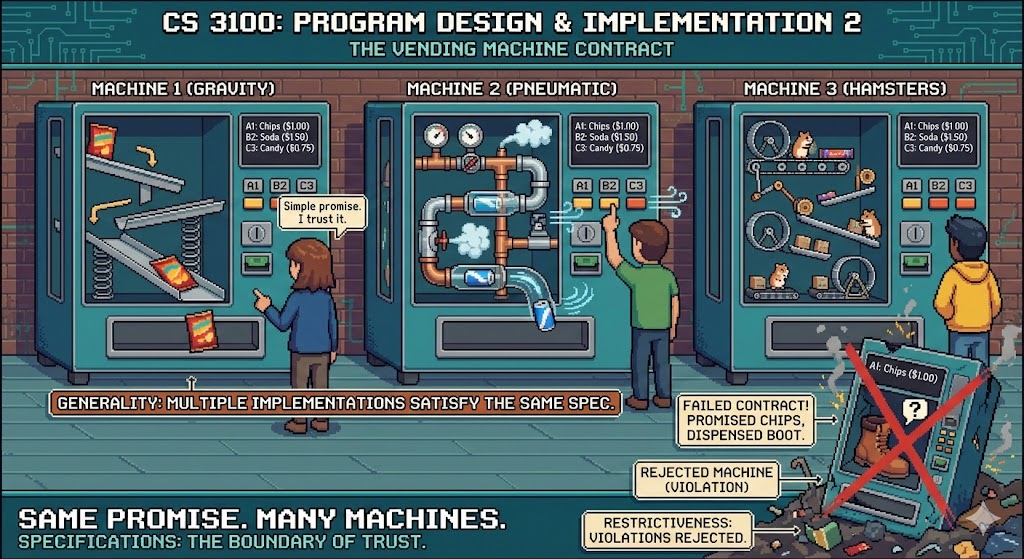
CS 3100: Program Design and Implementation II
Lecture 4: Specifications and Common Contracts
©2025 Jonathan Bell, CC-BY-SA
Learning Objectives
After this lecture, you will be able to:
- Describe the role of method specifications in achieving program modularity and improving readability
- Evaluate the efficacy of a given specification using the terminology of restrictiveness, generality, and clarity
- Utilize type annotations to express invariants such as non-nullness
- Define the role of methods common to all Objects in Java (toString, equals, hashCode, compareTo)
Humans Can Only Hold 7±2 Items in Working Memory
Which is easier to remember?
- Random order: 50, 30, 60, 20, 80, 10, 40, 70
- Pattern: 10, 20, 30, 40, 50, 60, 70, 80
Chunking Lets Us Manage More Than 7 Items
Chunking = organizing information into meaningful units
- "FBI" is 1 chunk, not 3 letters
- "555-1234" is 2 chunks, not 7 digits
- A chess master sees "castled king position" not 5 pieces
Expert programmers chunk code the same way:
- "Binary search" → one chunk (not 15 lines)
- "HashMap lookup" → one chunk (not the internal algorithm)
Specifications Enable Mental Chunking for Code
When reading a program, we want to understand method behavior without reading the implementation.
Without spec: 🤯
public boolean mystery(Object[] arr, Object o) {
    for (int i = 0; i < arr.length; i++) {
        if (arr[i].equals(o)) return true;
    }
    return false;
}
Must read every line to understand
With spec: 😌
/**
 * Returns true if this collection contains
 * the specified element.
 * @return true if this collection contains o
 */
boolean contains(Object o);
Spec tells you what it does
You Spend 10x More Time Reading Code Than Writing It
Consider understanding this call from L3:
Map<String, List<IoTDevice>> devicesByRoom = new HashMap<>();
devicesByRoom.get("living-room").add(new DimmableLight("lr1", 100));
Without spec:
- Open HashMap source (2000+ lines)
- Trace through hash buckets
- Understand resize logic
- Time: 30+ minutes
With spec:
- Read Map.get() Javadoc
- "Returns the value for this key, or null"
- Time: 30 seconds
You used HashMap without reading its 2000-line implementation!
A Good Specification Lets You Predict Behavior
The goal: a developer can understand what a method does without reading its code.
- Any implementation that satisfies the spec is correct
- Any implementation that violates the spec is incorrect
- The spec should be easier to understand than the implementation
But how do we evaluate whether a specification is good?
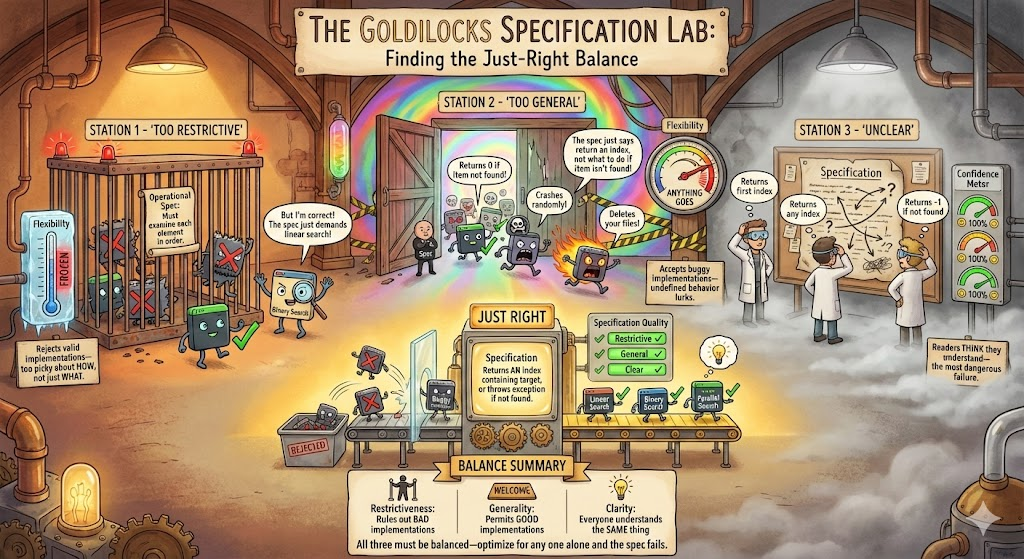
Good Specifications Balance Three Criteria
Restrictive Specs Rule Out Bad Implementations
A spec is restrictive if it rules out implementations that clients would find unacceptable.
Think of it as: "What BAD behaviors does this spec prohibit?"
- Does it specify what happens for ALL inputs?
- Does it prohibit surprising or dangerous behavior?
- Could a malicious implementer satisfy it while being useless?
Under-Specified Behavior Allows Bugs to Hide
Consider this spec for Map.get():
/**
 * Returns the value associated with the specified key.
 * @param key the key whose value is to be returned
 * @return the value associated with key
 */
V get(Object key);
What happens if the key isn't in the map?
- Return null?
- Throw KeyNotFoundException?
- Return a default value?
Every Input Needs Defined Behavior
✓ The actual Map.get() specification:
/**
 * Returns the value to which the specified key is mapped,
 * or null if this map contains no mapping for the key.
 *
 * @param key the key whose associated value is to be returned
 * @return the value to which the specified key is mapped,
 *         or null if this map contains no mapping for the key
 * @throws ClassCastException if the key is of an inappropriate type
 * @throws NullPointerException if the key is null and this map
 *         does not permit null keys
 */
V get(Object key);
Now every input has defined behavior.
Silence in a Spec Means Undefined Behavior
❌ Underspecified:
/**
 * Returns an iterator over
 * the elements in this set.
 * @return an Iterator over the
 *         elements in this set
 */
public Iterator<E> iterator()
Client might assume insertion order...
✓ Properly specified:
/**
 * Returns an iterator over
 * the elements in this set.
 * The elements are returned in
 * no particular order.
 * @return an Iterator over the
 *         elements in this set
 */
public Iterator<E> iterator()
Assuming Unspecified Behavior Creates Flaky Tests
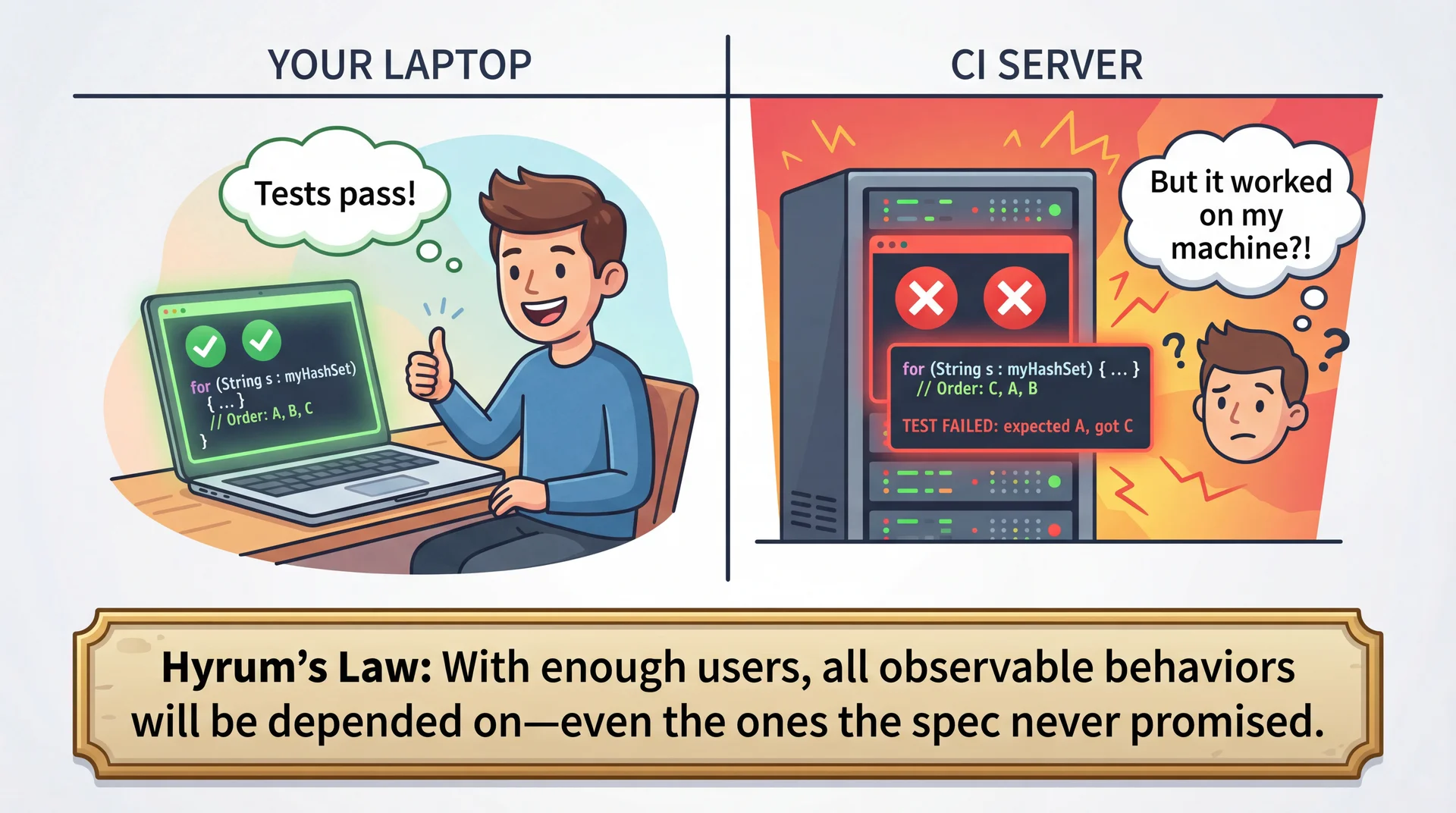
"Works on my machine" isn't a specification!
General Specs Don't Over-Constrain Implementations
A spec is general if it doesn't rule out implementations that would be correct.
Think of it as: "What GOOD implementations does this spec allow?"
- Does it describe WHAT the method does, or HOW?
- Could a faster algorithm satisfy it?
- Does it over-specify implementation details?
Operational Specs Reject Valid Implementations
❌ Too operational (not general):
/**
 * Returns true if this set contains the specified element.
 * Iterates through all elements using a for-each loop,
 * comparing each element using equals().
 *
 * @param o the element to search for
 * @return true if found, false otherwise
 */
boolean contains(Object o);
This spec requires O(n) linear search!
Describe Results, Not Algorithms
✓ The actual Set.contains() specification:
/**
 * Returns true if this set contains the specified element.
 * More formally, returns true if and only if this set contains
 * an element e such that Objects.equals(o, e).
 *
 * @param o element whose presence in this set is to be tested
 * @return true if this set contains the specified element
 * @throws ClassCastException if the type of o is incompatible
 * @throws NullPointerException if o is null and this set
 *         does not permit null elements
 */
boolean contains(Object o);
This permits: HashSet (O(1)), TreeSet (O(log n)), LinkedHashSet...
The Right Balance Depends on What Callers Need
Compare these two List methods:
General (contains):
/**
 * Returns true if this list
 * contains the specified element.
 */
boolean contains(Object o);
Any implementation OK
Specific (indexOf):
/**
 * Returns the index of the first
 * occurrence of the specified
 * element, or -1 if not found.
 */
int indexOf(Object o);
Must return FIRST index
indexOf is more restrictive because callers need to know which occurrence.
The Most Dangerous Specs Are Misunderstood Specs
A spec is clear if readers understand it correctly.
The most dangerous specs are those where readers think they understand but don't.
- Too brief: Readers fill in gaps with assumptions
- Too long: Readers skim and miss important details
- Jargon-heavy: Readers guess at meaning
- Redundant: Readers wonder what's different about each statement
Redundancy Creates Confusion, Not Clarity
❌ Redundant (hurts clarity):
/**
 * Closes this stream and releases any resources.
 * This method closes the stream. After closing,
 * the stream is closed and cannot be used.
 * Closing releases resources held by the stream.
 */
void close() throws IOException;
"Close closes the closed stream" — we got it the first time!
Domain-Specific Terms Need Definitions
❌ Unclear (assumes domain knowledge):
/**
 * Iterates over elements in natural order.
 * @return an iterator in natural order
 */
Iterator<E> iterator();
✓ Clear (defines the term):
/**
 * Iterates over elements in natural order.
 * Natural order is defined by the elements' compareTo() method,
 * with smaller elements appearing before larger ones.
 * @return an iterator in ascending natural order
 */
Iterator<E> iterator();
The Same Spec Principles Apply at Every Scale
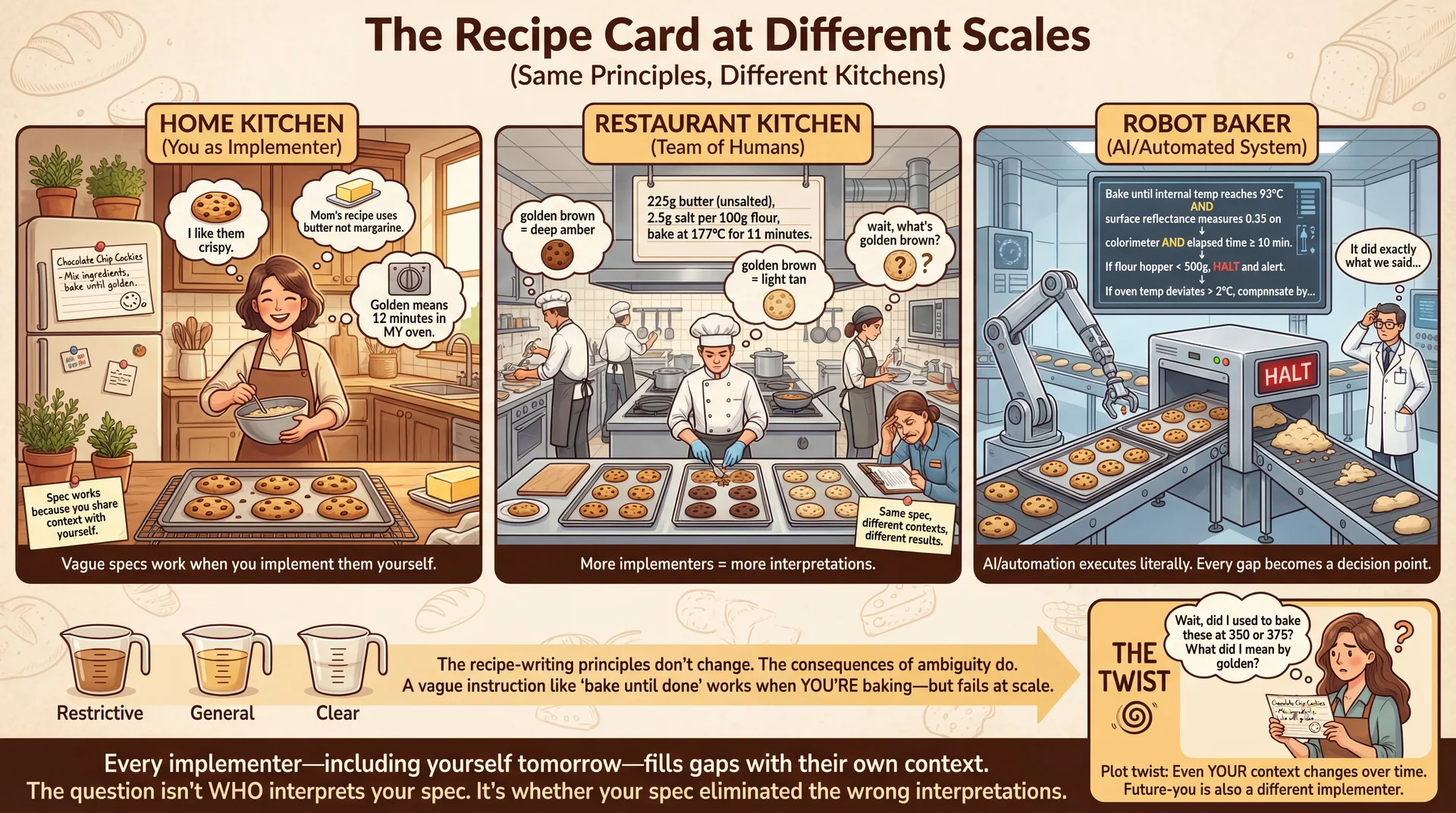
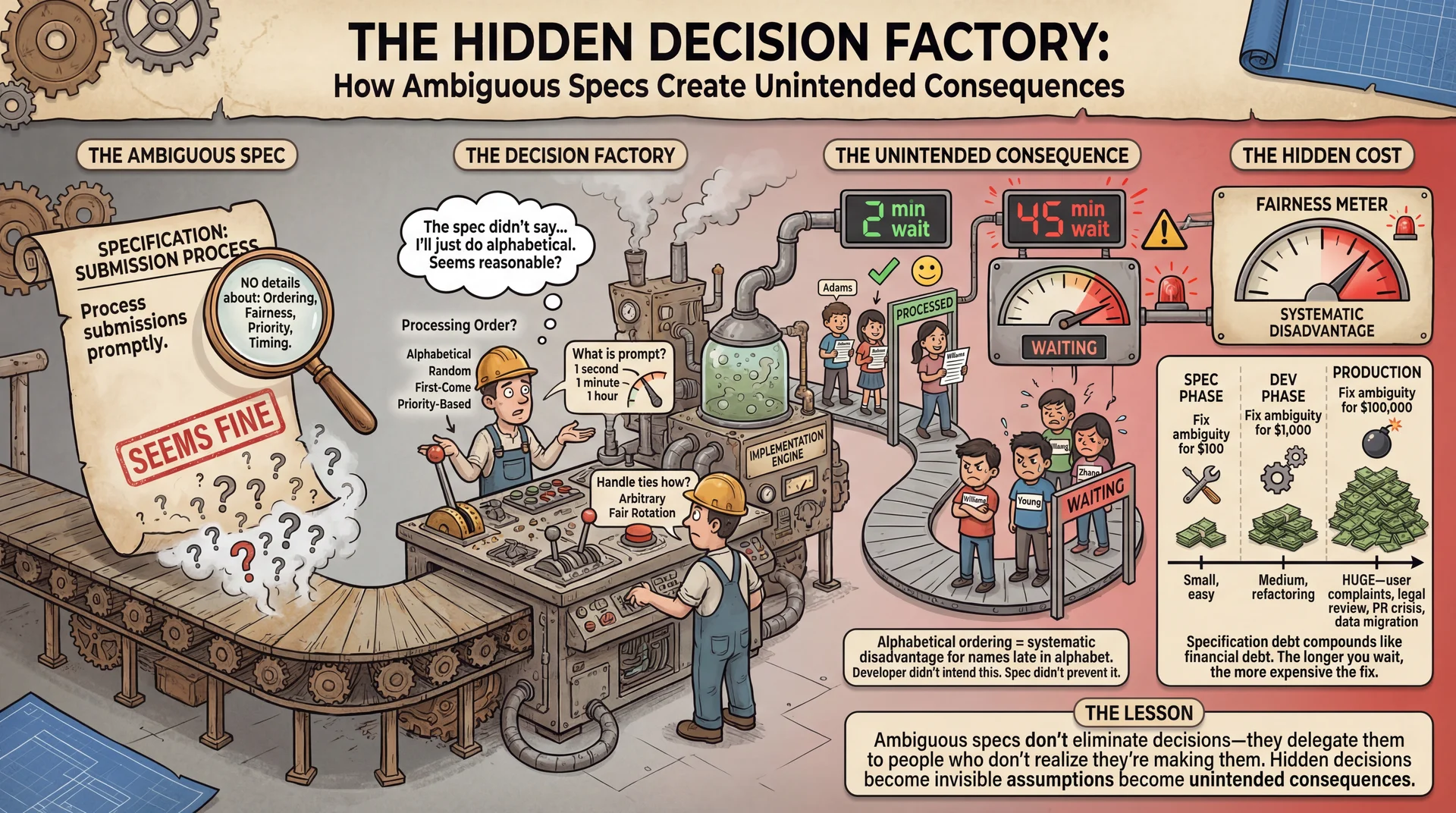
"Process" and "Handle" Are Not Specifications
Consider this IoT device manager API:
/**
 * Handles the given device event.
 *
 * @param event the device event to handle
 */
public void handleEvent(DeviceEvent event)
What does "handle" actually mean? Every implementer fills the gap differently.
- Log it? Update device state? Notify other devices?
- What if the device is offline? Retry? Queue for later?
- Thread-safe? Can it be called concurrently?
Ambiguity Creates Specification Debt
Type Annotations Let Compilers Enforce Specs
![Concept: 'The Factory Quality Control Line' (Comments vs Type Annotations)
A detailed factory floor illustration in a clean industrial design style, showing two parallel assembly lines for 'Method Calls' being quality-checked before shipping to production.
LEFT LINE - 'HONOR SYSTEM QUALITY CONTROL' (Comment-Only Specs):
A conveyor belt carrying method calls (visualized as packages labeled with their arguments). A laminated sign hangs above: '📋 PLEASE CHECK: arr should not be null - Javadoc says so!' A tired human inspector sits on a stool, barely glancing at packages as they roll by. One package clearly labeled 'null' rolls past—the inspector is looking at their phone. Behind the inspection point: CHAOS. Packages explode on contact with the 'Production' area (labeled 'Runtime'), sparks fly, a NullPointerException alarm blares, developers in hard hats scramble with fire extinguishers. A whiteboard shows: 'Days since last null crash: 0̶ ̶3̶ ̶7̶ 0'. Annotation: 'Comments are suggestions. Humans skip reading them. Bugs ship to production.'
RIGHT LINE - 'AUTOMATED QUALITY GATE' (Type Annotations):
The same conveyor belt, but now it passes through an imposing automated scanner (glowing, precise, robotic). The scanner display shows: '@NonNull int[] arr — SCANNING...' Valid packages (with proper non-null arrays) get a green checkmark stamp and proceed smoothly to 'Production'. But the 'null' package hits an invisible force field—red lights flash, the scanner announces 'REJECTED: null violates @NonNull constraint', and the package is automatically diverted to a 'Fix Before Shipping' chute that loops back to the developer's desk. Beyond the gate: calm, orderly production floor. A whiteboard shows: 'Days since last null crash: 847'. Annotation: 'Type annotations are machine-enforced. Bugs caught before shipping.'
CENTER COMPARISON PANEL:
Split view showing the same code:
- Top: '// @param arr must not be null' + 'sum(null);' → Package makes it to production → 💥 RUNTIME CRASH
- Bottom: '@NonNull int[] arr' + 'sum(null);' → Package rejected at compile time → 🔧 Developer fixes it
DETAIL CALLOUTS:
- On the scanner: 'Powered by NullAway + JSpecify' with small logos
- Developer reaction left: 😰 'Why did this crash in production at 3am?!'
- Developer reaction right: 😊 'Caught it before I even ran the tests'
BOTTOM:
A timeline showing: 'Java 8 (2014): Type annotations added' with small portraits of the UW researchers. Caption: 'Moving specs from comments (that humans ignore) to types (that compilers enforce).'
Style: Industrial factory aesthetic with warm yellows/oranges on the chaotic left side, cool blues/greens on the orderly right side. Clean lines, clear labels, immediate visual contrast. Should feel like a safety training poster that makes a compelling case for type annotations. The factory metaphor works because it emphasizes: quality control BEFORE shipping is cheaper than recalls AFTER.](/img/lectures/web/l4-type-annotations.webp)
Type annotations let the compiler enforce specification invariants.
@NonNull Turns Documentation Into Enforcement
import org.jspecify.annotations.NonNull;
import org.jspecify.annotations.Nullable;

public int sum(@NonNull int[] arr) {
    int sum = 0;
    for (int i = 0; i < arr.length; i++) {
        sum += arr[i];
    }
    return sum;
}
With @NonNull, the compiler enforces that arr is never null.
Note: Java has many competing @NonNull definitions. We use JSpecify.
@NullMarked Makes Non-Null the Default
Mark the whole package as "non-null by default":
// In package-info.java
@NullMarked
package edu.neu.cs3100.myproject;

import org.jspecify.annotations.NullMarked;
Now only mark exceptions with @Nullable:
// In a @NullMarked package:
public int sum(int[] arr) { ... }  // arr assumed non-null

public String format(@Nullable String prefix, String value) { ... }
// prefix can be null, value cannot
Annotations Make Nullability Explicit at a Glance
// In a @NullMarked package

/**
 * Formats a user's display name.
 *
 * @param firstName the user's first name
 * @param middleName the user's middle name, or null if none
 * @param lastName the user's last name
 * @return formatted name (such as "John Q. Public")
 */
public String formatName(
    String firstName,            // non-null (default)
    @Nullable String middleName, // explicitly nullable
    String lastName              // non-null (default)
) {
    if (middleName == null) {
        return firstName + " " + lastName;
    }
    return firstName + " " + middleName.charAt(0) + ". " + lastName;
}
Legacy Code Requires Gradual Annotation Adoption
Two approaches for existing codebases:
Approach A: @NullMarked (new code)
- Mark new packages @NullMarked
- Existing code left unannotated
- Gradually migrate package by package
Approach B: @NonNull everywhere (legacy)
- Don't use @NullMarked
- Add @NonNull as you verify each type
- Safer but more verbose
For this course: new projects use @NullMarked. You'll see this in starter code.
Unannotated Libraries Need Runtime Assertions
Even java.util isn't fully annotated! The checker can't know if library methods return null.
String name = "Alice";
List<String> names = List.of(name); // Checker: "might be null!"
System.out.println(names.size()); // Warning!
Use Objects.requireNonNull to assert your domain knowledge:
List<String> names = Objects.requireNonNull(List.of(name));
// Checker now knows names is non-null
Every Java Object Inherits Four Key Contracts
Every class extends java.lang.Object, which defines methods you should consider overriding:
toString()— human-readable representationequals(Object)— logical equalityhashCode()— hash value for collections
Plus the Comparable interface:
compareTo(T)— natural ordering
toString Should Be Concise But Informative
From the Java documentation:
"Returns a string that textually represents this object. The result should be a concise but informative representation that is easy for a person to read."
Default (useless):
DimmableLight@1a2b3c4d
Overridden (helpful):
DimmableLight(color=2700K,
  brightness=100, on=true)
Good toString Saves Hours of Debugging
// From the IoT device hierarchy in L3
@Override
public String toString() {
    return "DimmableLight(id=" + id + ", " +
           "brightness=" + brightness + ", " +
           "on=" + isOn() + ")";
}
Best practices:
- Include the class name
- Include fields that matter for understanding the object
- Format for readability (not just dump all fields)
When you System.out.println(deviceList), good toString() makes debugging easy.
What does this print (==)?
public class DimmableLight {
    private String id;
    private int brightness;

    public DimmableLight(String id, int brightness) {
        this.id = id;
        this.brightness = brightness;
    }

    public static void main(String[] args) {
        DimmableLight light1 = new DimmableLight("living-room", 100);
        DimmableLight light2 = new DimmableLight("living-room", 100);
        System.out.println(light1 == light2);
    }
}
A. true
B. false
C. I have no idea

What does this print (equals()) ?
public class DimmableLight {
    private String id;
    private int brightness;

    public DimmableLight(String id, int brightness) {
        this.id = id;
        this.brightness = brightness;
    }

    public static void main(String[] args) {
        DimmableLight light1 = new DimmableLight("living-room", 100);
        DimmableLight light2 = new DimmableLight("living-room", 100);
        System.out.println(light1.equals(light2));
    }
}
A. true
B. false
C. I have no idea
Where does equals() come from?
Object's implementation:
public boolean equals(Object obj) {
    return (this == obj);
}
Since DimmableLight doesn't override equals(), it inherits this version—which just checks reference equality.
Overriding equals()
public class DimmableLight {
    private String id;
    private int brightness;

    // ... constructor ...

    @Override
    public boolean equals(Object obj) {
        if (this == obj) return true;
        if (!(obj instanceof DimmableLight other)) return false;
        return brightness == other.brightness
            && Objects.equals(id, other.id);
    }

    @Override
    public int hashCode() {
        return Objects.hash(id, brightness);
    }
}
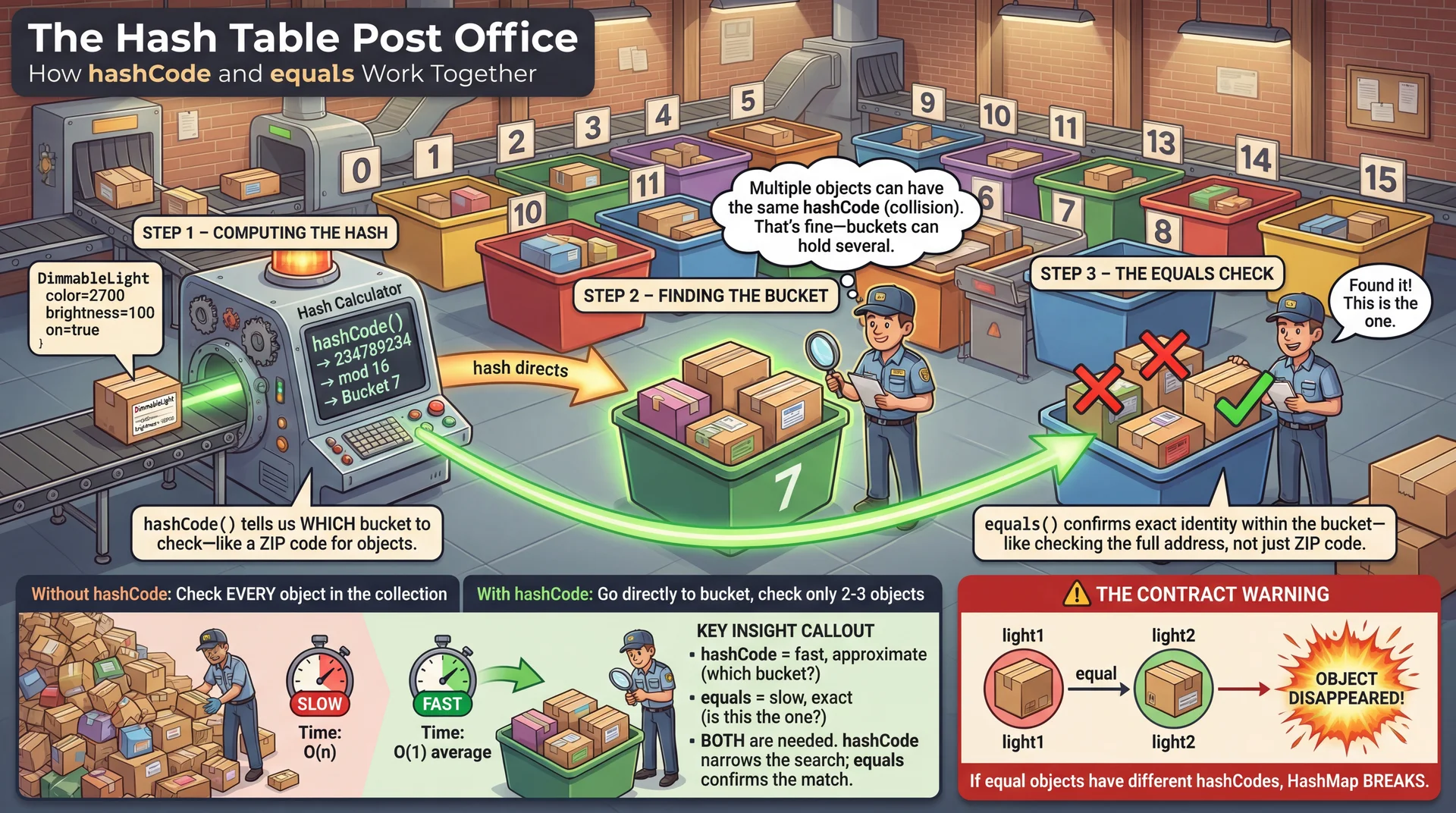
What's hashCode()? And why do we need it?
hashCode Enables O(1) Lookup in HashSets and HashMaps
Why override hashCode()?
Object's hashCode() returns a value based on the object's memory address.
Can two different objects have the same memory address? No.
// DimmableLight with equals() but NO hashCode() override
DimmableLight light1 = new DimmableLight("living-room", 100);
DimmableLight light2 = new DimmableLight("living-room", 100);

System.out.println(light1.equals(light2));  // true (we overrode equals)

Set<DimmableLight> lights = new HashSet<>();
lights.add(light1);
System.out.println(lights.contains(light2));  // false!
The problem: light1 and light2 are equal, but have different hash codes, so HashSet looks in the wrong bucket.
Equal Objects Must Have Equal hashCode() Values
The contract (simplified):
- Required: If
x.equals(y), thenx.hashCode() == y.hashCode() - Recommended: If
!x.equals(y), hash codes should differ - Required: Consistent within one execution
⚠️ If you override equals, you must override hashCode!
Use the Same Fields in hashCode as in equals
// For DimmableLight with fields: id, brightness
@Override
public int hashCode() {
    int result = Objects.hashCode(id);
    result = 31 * result + Integer.hashCode(brightness);
    return result;
}

// Or simply:
@Override
public int hashCode() {
    return Objects.hash(id, brightness);
}
Use the same fields as equals. See Effective Java Item 11 for details.
Sorting with the Comparable Interface

The Comparable Interface
public interface Comparable<T> {
    /**
     * Compares this object with the
     * specified object for order.
     *
     * @return negative if this < o,
     *         zero if this == o,
     *         positive if this > o
     */
    int compareTo(T o);
}
compareTo Defines How Objects Sort Naturally
For classes with a natural order, implement Comparable<T>:
/**
 * A dimmable light. Lights are ordered by id, then by brightness.
 */
public class DimmableLight implements Comparable<DimmableLight> {
    private String id;
    private int brightness;

    @Override
    public int compareTo(DimmableLight other) {
        int idCompare = this.id.compareTo(other.id);
        if (idCompare != 0) {
            return idCompare;  // different ids
        }
        // same id, sort by brightness
        return Integer.compare(this.brightness, other.brightness);
    }
}
Returns: negative if this < other, zero if equal, positive if this > other
Summary: Specifications as Contracts
- Specifications enable modularity — you used HashMap without reading its 2000 lines
- Good specs balance three criteria:
- Restrictiveness — Map.get() specifies null for missing keys
- Generality — Set.contains() permits O(1) or O(log n) implementations
- Clarity — no redundancy, domain terms defined
- Type annotations make specs machine-checkable (@NullMarked, @Nullable)
- Object contracts (toString, equals, hashCode, compareTo) enable Collections to work
Critical rule: Override equals → MUST override hashCode (or HashSet breaks!)
Next Steps
- Assignment 1 due Thursday, January 15 at 11:59 PM
- Complete flashcard set 4 (Specifications & Contracts)
Optional readings:
- Effective Java, Items 10-14 (equals, hashCode, toString, Comparable)
- Liskov & Guttag, Chapter 9.2 (Specification theory)
- JSpecify Documentation (Nullness annotations standard)
Next time: Functional Programming and Readability